Redis With Go
Redis is 100x faster than Postgres
1. Redis Use Case
- Atomic Counter

Incr(ctx context.Context, key string)increments the count for the corresponding key by 1 — for example, video play counts, or product inventory in flash-sale scenarios.INCRBYadds an arbitrary value, which can be negative.- If we use database to count, every video play or number of product update, will need to update the database, all the updates have to compete the row lock to update the result
- With Redis Atomic single thread, use the INCR command, performance will be great and will not count wrong
- Caching
- Put frequently accessed Postgres data into Redis (EG: During flash sale, put those hot products to redis to search in redis, much faster access with Redis, and reduce load of postgres)
- Cache Aside
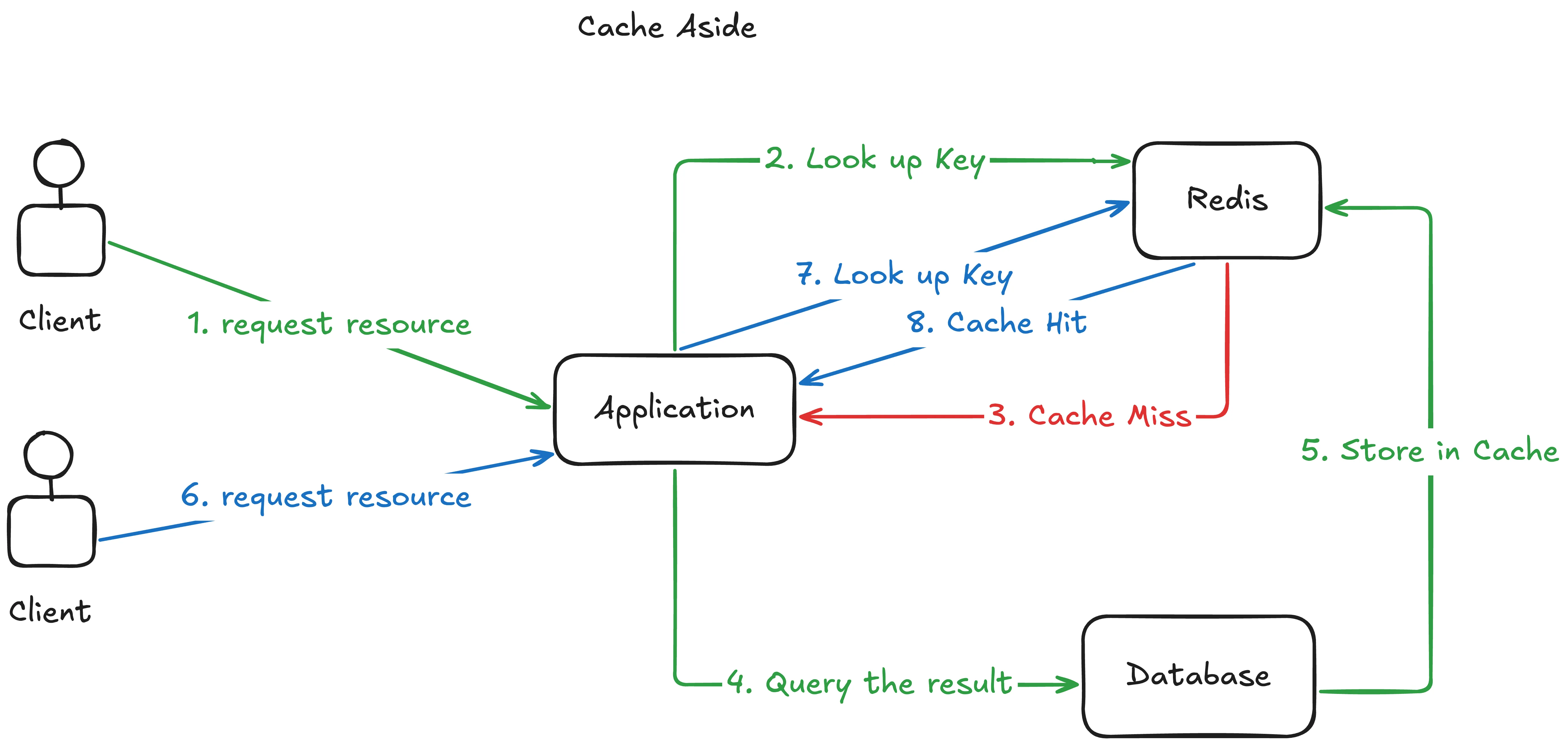
- The application first checks Redis for the requested key,
- If the key exists (a cache hit), the application returns the cached result.
- If the key does not exists (a cache miss), the application queries he database and stores the retrieved result in Redis
- Subsequent requests for the same key can retrieve the result directly from Redis, reducing database queries and improving
- Distributed Sesssion Caching
- Session ID is used to mark a user as successful login. As subequent login or operations may hit different servers, so session id can store in redis as distributed cached
- Distributed Locks
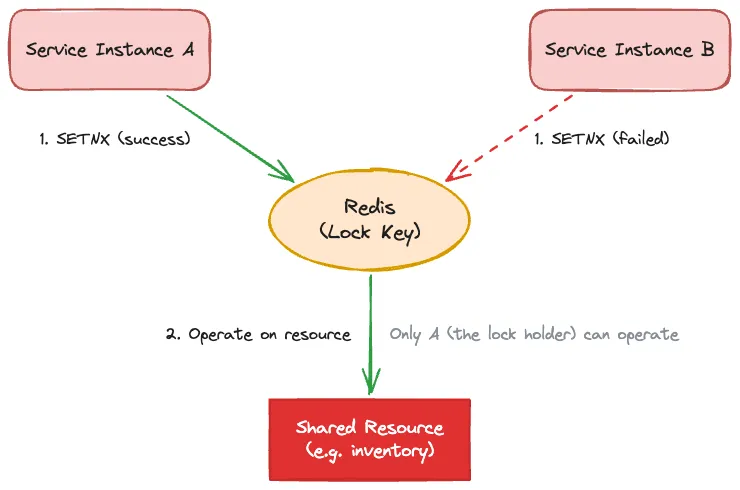
- In a distributed system, a scheduled task only needs to be executed by one server — whoever grabs the lock executes it, and releases the lock before the next cycle arrives.
- Publish and Subcribe
- A small volume of event notifications can be implemented with Redis
- Ranking with ZSet
- Rate Limiting with Redis Lua Script
2. Redis Usage in Go
a. Install Redis
brew install redis
brew services start redis
b. Test Redis
redis-cli
set name fulim
get name
set age 24
# the returned age is string
get age
3. Install Redis module in go
go get require github.com/redis/go-redis/v94. Connect to Redis with Go
client = redis.NewClient(&redis.Options{
		Addr:     "127.0.0.1:6379",
		DB:       0,  // Redis creates DB 0-15 by default; this uses the default DB
		Password: "", // No password
	})
	// The connection is only established successfully if ping succeeds
	if err := client.Ping(context.Background()).Err(); err != nil {
		slog.Error("connect to redis failed", "error", err)
	} else {
		slog.Info("connect to redis")
	}
5. String
func StringValue(ctx context.Context, client *redis.Client) {
	key := "name"
	value := "Fu Lim"
	defer client.Del(ctx, key) // Delete the key when the function ends, so the next run is not affected

	err := client.Set(ctx, key, value, 1*time.Second).Err() // Expires after 1 second. 0 means never expire
	checkError(err)

	client.Expire(ctx, key, 3*time.Second) // Use Expire to set a 3-second TTL. This works for any redis value type
	time.Sleep(2 * time.Second)

	v2, err := client.Get(ctx, key).Result()
	checkError(err)
	fmt.Println(v2)

	err = client.Set(ctx, "age", 24, 1*time.Second).Err() // An int is converted to a string once written to redis
	checkError(err)
	v3, err := client.Get(ctx, "age").Int()
	checkError(err)
	fmt.Printf("age=%d\n", v3)
}

func checkError(err error) {
	if err != nil {
		if err == redis.Nil { // When reading from redis fails, it is usually because the key does not exist
			fmt.Println("the key does not exist")
		} else {
			fmt.Println(err)
			os.Exit(1)
		}
	}
}
6. Struct
func WriteStudent2Redis(ctx context.Context, client *redis.Client, stu *Student) error {
	if stu == nil {
		return nil
	}
	key := "STU_" + strconv.Itoa(stu.Id) // Use a prefix to avoid collisions between different kinds of ids
	v, err := json.Marshal(stu)
	if err != nil {
		return err
	}
	err = client.Set(ctx, key, string(v), 5*time.Minute).Err()
	return err
}

func GetStudentFromRedis(ctx context.Context, client *redis.Client, sid int) *Student {
	key := "STU_" + strconv.Itoa(sid) // Use a prefix to avoid collisions between different kinds of ids
	v, err := client.Get(ctx, key).Result()
	if err != nil {
		if err != redis.Nil { // redis.Nil is returned when the key does not exist
			log.Println(err)
		}
		return nil
	}
	var stu Student
	err = json.Unmarshal([]byte(v), &stu)
	if err != nil {
		log.Println(err)
		return nil
	}
	return &stu
}
7. Delete Key
func DeleteKey(ctx context.Context, client *redis.Client) {
	n, err := client.Del(ctx, "not_exists").Result()
	if err == nil {
		fmt.Printf("deleted %d key(s)\n", n)
	}
}
8. List
func ListValue(ctx context.Context, client *redis.Client) {
	key := "ids"
	defer client.Del(ctx, key)

	values := []interface{}{1, "lim", 3, 4, 3, 1}  // A mix of data types
	err := client.RPush(ctx, key, values...).Err() // RPush appends to the right of the List, LPush prepends to the left. The List is created if it does not exist
	checkError(err)

	v2, err := client.LRange(ctx, key, 0, -1).Result() // A slice with both ends inclusive. LRange means List Range, i.e. iterate the List. 0 is the first element, -1 is the last one. v2 is a []string, so 1, 3 and 4 are actually stored in redis as strings
	checkError(err)
	fmt.Println(v2)
}
9. Set
func SetValue(ctx context.Context, client *redis.Client) {
	key := "ids"
	defer client.Del(ctx, key)

	values := []interface{}{1, "lim", 3, 4, 3, 1} // 1, 3 and 4 are actually stored in redis as strings
	err := client.SAdd(ctx, key, values...).Err() // SAdd adds elements to the Set; duplicates are not allowed in a set
	checkError(err)

	// Check whether the Set contains a given element
	var value any
	value = 1 // The number 1 is converted to a string before being looked up in redis
	if client.SIsMember(ctx, key, value).Val() {
		fmt.Printf("the Set contains %#v\n", value)
	} else {
		fmt.Printf("the Set does not contain %#v\n", value)
	}
	value = "1"
	if client.SIsMember(ctx, key, value).Val() {
		fmt.Printf("the Set contains %#v\n", value)
	} else {
		fmt.Printf("the Set does not contain %#v\n", value)
	}
	value = 2
	if client.SIsMember(ctx, key, value).Val() {
		fmt.Printf("the Set contains %#v\n", value)
	} else {
		fmt.Printf("the Set does not contain %#v\n", value)
	}

	// Iterate the Set
	for _, ele := range client.SMembers(ctx, key).Val() {
		fmt.Println(ele)
	}

	key2 := "ids2"
	defer client.Del(ctx, key2)
	values = []interface{}{1, "wong", "fu", "lim"}
	err = client.SAdd(ctx, key2, values...).Err() // SAdd adds elements to the Set
	checkError(err)

	// Difference
	fmt.Println("key - key2 difference")
	for _, ele := range client.SDiff(ctx, key, key2).Val() {
		fmt.Println(ele)
	}
	fmt.Println("key2 - key difference")
	for _, ele := range client.SDiff(ctx, key2, key).Val() {
		fmt.Println(ele)
	}

	// Intersection
	fmt.Println("key & key2 intersection")
	for _, ele := range client.SInter(ctx, key, key2).Val() {
		fmt.Println(ele)
	}
}
10. ZSet
// The value is a ZSet (a sorted Set)
func ZsetValue(ctx context.Context, client *redis.Client) {
	key := "ids"
	defer client.Del(ctx, key)

	values := []redis.Z{{Member: "Fu Lim", Score: 70.0}, {Member: "Fu ji", Score: 100.0}, {Member: "Wong Fu", Score: 80.0}} // Score is used for ordering, for example you can assign a timestamp to it
	err := client.ZAdd(ctx, key, values...).Err()
	checkError(err)

	// Iterate the ZSet, printing the Members ordered by Score
	for _, ele := range client.ZRange(ctx, key, 0, -1).Val() {
		fmt.Println(ele)
	}
}
11. Hash
func HashtableValue(ctx context.Context, client *redis.Client) {
	student1 := map[string]interface{}{"Name": "Fu Lim", "Age": 18, "Height": 173.5}
	err := client.HSet(ctx, "student1", student1).Err() // The H prefix stands for HashTable. HSet can set multiple fields at once on redis-server 4.0 and later
	checkError(err)
	student2 := map[string]interface{}{"Name": "Fu Ji", "Age": 20, "Height": 180.0}
	err = client.HSet(ctx, "student2", student2).Err()
	checkError(err)

	age, err := client.HGet(ctx, "student2", "Age").Int() // Give both the redis key and the key inside the map
	checkError(err)
	fmt.Printf("age=%d\n", age)

	for field, value := range client.HGetAll(ctx, "student1").Val() { // GetAll returns the whole map
		fmt.Printf("field:%s  value:%s\n", field, value)
	}

	client.Del(ctx, "student1")
	client.Del(ctx, "student2")
}
11. SCAN in Redis
// Iterate over keys. Using the keys command scans the whole database, and since redis is
// single-threaded it would block for a long time.
//
// SCAN cursor [MATCH pattern] [COUNT count]. Things to keep in mind about the scan command:
//
// 1. A returned cursor of 0 means the iteration is finished. Pass a cursor of 0 on the first Scan to start a new iteration. The cursor is a slot value inside the HashTable, it does not simply increase.
//
// 2. count is how many keys are visited in one pass, and none of them may match the pattern. 10000 is a reasonable value: the larger the count, the shorter the total time, but the longer a single query blocks.
//
// 3. The results may contain duplicates, and the client has to deduplicate them. This is very important.
//
// 4. If data is modified during the iteration, whether the modified data is visited is undefined.
//
// 5. An empty result for one pass does not mean the iteration is over; check whether the returned cursor is 0.
func Scan(ctx context.Context, client *redis.Client) {
	if client == nil {
		log.Printf("connect redis failed")
		os.Exit(1)
	}
	const (
		MID = "_fl_"
	)
	for i := 0; i < 10; i++ {
		// Create 10 keys, all matching the pattern *_fl_*
		key := strconv.Itoa(i) + MID + strconv.Itoa(i)
		err := client.Set(ctx, key, "1", 0).Err()
		if err != nil {
			fmt.Println(err)
		}
	}
	// Delete the 10 keys that were created
	defer func() {
		for i := 0; i < 10; i++ {
			key := strconv.Itoa(i) + MID + strconv.Itoa(i)
			client.Del(ctx, key)
		}
	}()
	const COUNT = 100 // The batch size for the iteration; 10000 is recommended
	var cursor uint64 = 0
	dup := make(map[string]struct{}, 10) // Deduplicate the keys returned by the iteration
	for {
		// Fetch all keys matching the pattern. If the match argument is empty, every key in the database is visited
		keys, c, err := client.Scan(ctx, cursor, "*"+MID+"*", COUNT).Result()
		if err != nil {
			fmt.Println(err)
			break
		}
		fmt.Printf("cursor %d keys count %d\n", c, len(keys))
		for _, key := range keys {
			dup[key] = struct{}{}
		}
		if c == 0 {
			break
		}
		cursor = c // The cursor returned by this scan is used as the cursor for the next one
	}
	fmt.Println("total", len(dup))
	for key := range dup {
		fmt.Println(key)
	}
}
Example with Reds-cli
> redis-cli
127.0.0.1:6379> scan 0 match "*_fl_*" count 5
1) "4"
2) 1) "7_fl_7"
   3) "3_fl_3"
   4) "9_fl_9"
   5) "0_fl_0"
   6) "5_fl_5"
127.0.0.1:6379> scan 4 match "*_fl_*" count 5
7) "11"
8) 1) "6_fl_6"
   9) "2_fl_2"
   10) "8_fl_8"
   11) "4_fl_4"
127.0.0.1:6379> scan 11 match "*_fl_*" count 5
12) "0"
13) 1) "1_fl_1"