Redis Master Slave Replication
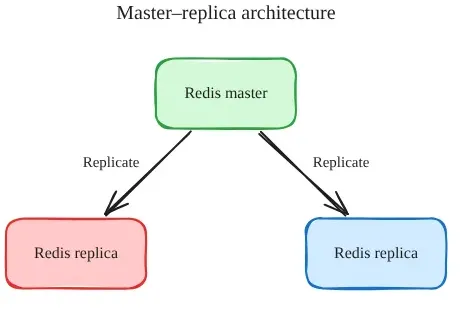 A replica (Slave) treats the master as its primary data source and copies data from the master to keep its data sync.
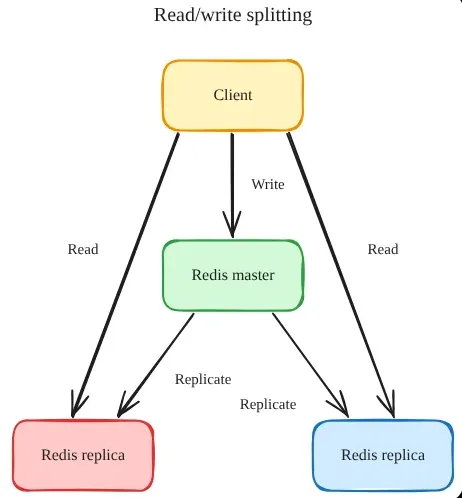 A master–replica setup allows read/write splitting. Write operations go to the master, and read operations go only to the replicas. This reduces the load on the master.
a. Analogy of Implementation
every word into their notebook.
The runid is the teacher’s name tag. Every time the teacher starts up, they get a brand-new random name tag, something like 8a3f…c91. The kid writes it at the top of their notebook: “I’m copying from teacher 8a3f.” If the kid later comes back and the name tag is different, the kid knows it’s a different teacher (or the same one after a restart who forgot everything), so the old notebook can’t be trusted. The kid has to throw it away and copy the whole story from the beginning.
The offset is the word count. The teacher keeps track of how many words they’ve read so far, say 1,000. The kid also counts how many words they’ve copied, say 1,000. If both numbers match, they’re in sync.
Why both matter: the kid goes to the bathroom. While the kid is gone, the teacher keeps reading, now at word 1,050. The kid comes back and says: “Hi teacher 8a3f, I stopped at word 1,000.”
If the name tag matches and the teacher still remembers words 1,001–1,050 (Redis keeps recent writes in a small buffer called the replication backlog), the teacher just reads those 50 missed words. That’s a partial resync, which is quick and cheap. If the name tag doesn’t match, or the kid was gone so long that the teacher’s short memory no longer holds word 1,001, the teacher says “start over” and hands over a full copy of the story (an RDB snapshot). That’s a full resync, which is slow and expensive.
The grown-up version: when a replica reconnects, it sends PSYNC runid offset. The master replies +CONTINUE (partial resync) or +FULLRESYNC runid offset (start over).
b. Implementation
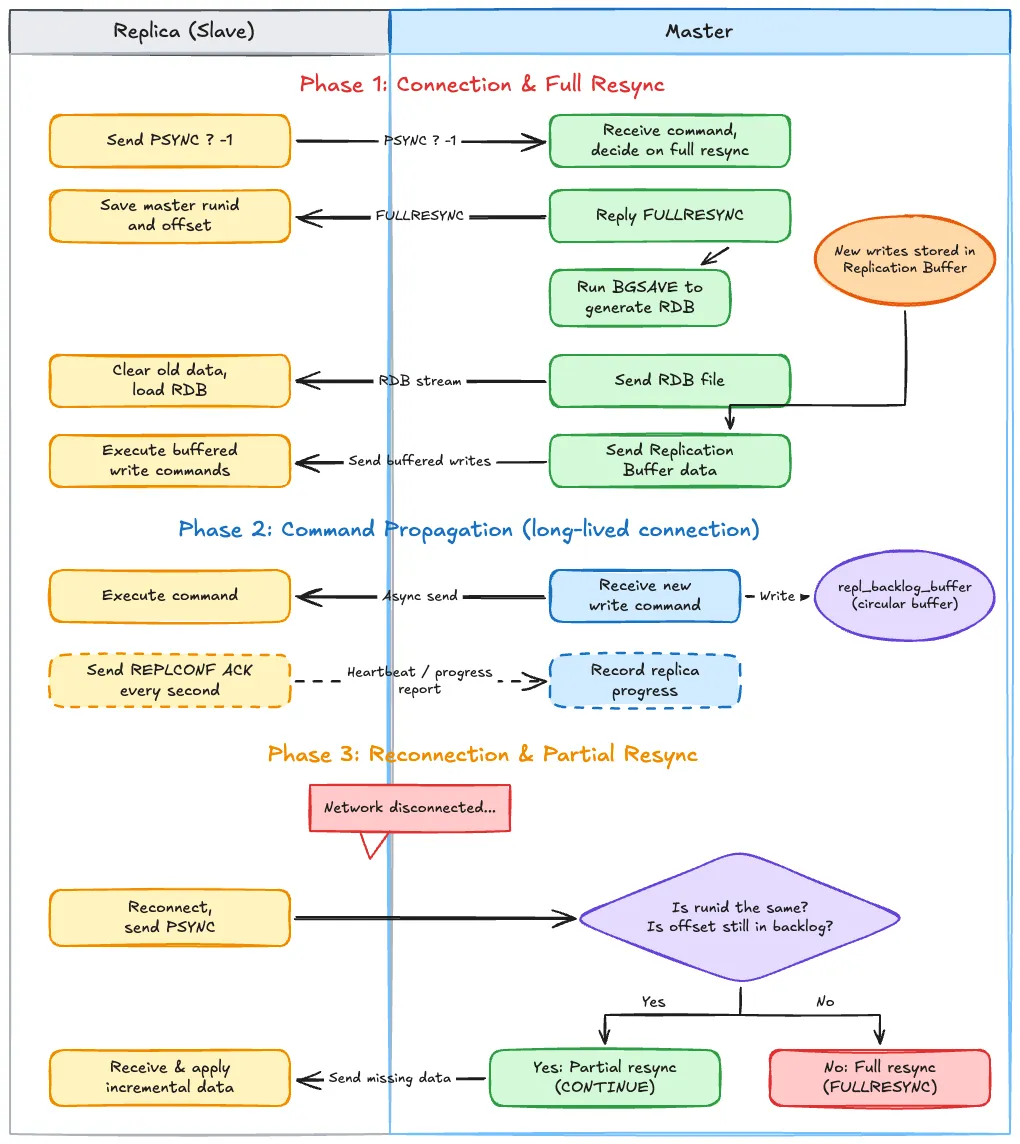
Phase 1: Establish Connection & Full Sync
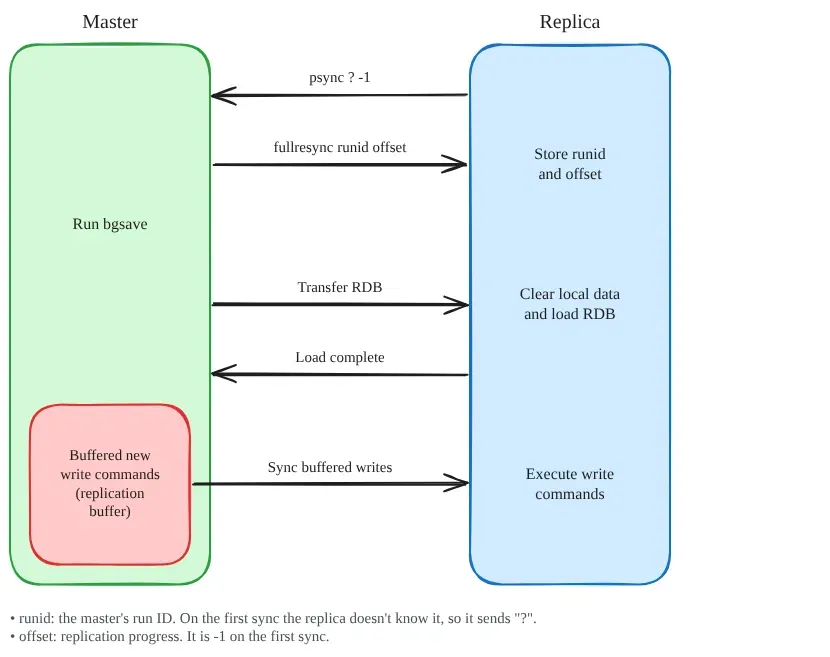
- When a replica connects to the master for the first time, it sends a PSYNC (runid) (offset) command
runidis the master’s run ID. On the first sync the replica doesn’t know the master’s ID, so it sends “?”.offsetis the replication progress. On the first sync it is -1.
- The master receives the psync command and sees that no runid was given, so it decides on a full sync. It replies with +FULLRESYNC and its runid and offset
- Replica store both the runid and offset sent by master
- The master runs bgssave to generate an RDB file. While the RDB file is being generated, any new write commands/receive to the master are stored in the replication buffer
- When RDB file is ready, the master sends it to replica. The replica clears its old data and load RDS data
- After the replica finished loading the RDS file, the master send the remaining write command from replication buffer to the replica. The replica execute them to keep the data consistent
Phase 2: Command Propagation (long-lived connection)
After the full sync completes, the master and replica keep a long-lived connection. From then on, every write command the master receives is sent asynchronously to the replica, which simply executes it. During this time they also exchange heartbeats (Ping/Ack) to confirm the other side is still alive.
Phase 3: Reconnection and Partial Sync
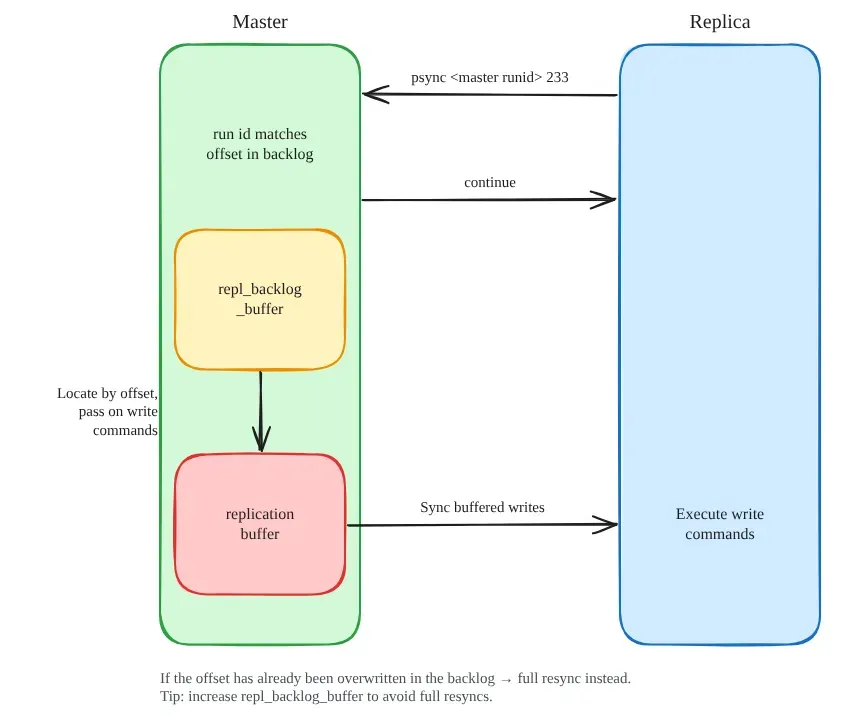 The network between master and replica can be unreliable. If the connection drops, some of the master’s writes may not reach the replica, and the data becomes inconsistent.
One option is to run another full sync, but a full sync moves a lot of data and takes a long time. So Redis 2.8 introduced incremental sync (psync itself was added in 2.8). It only needs to send the replica the data from the period when the connection was down.
This is where repl_backlog_buffer comes in.
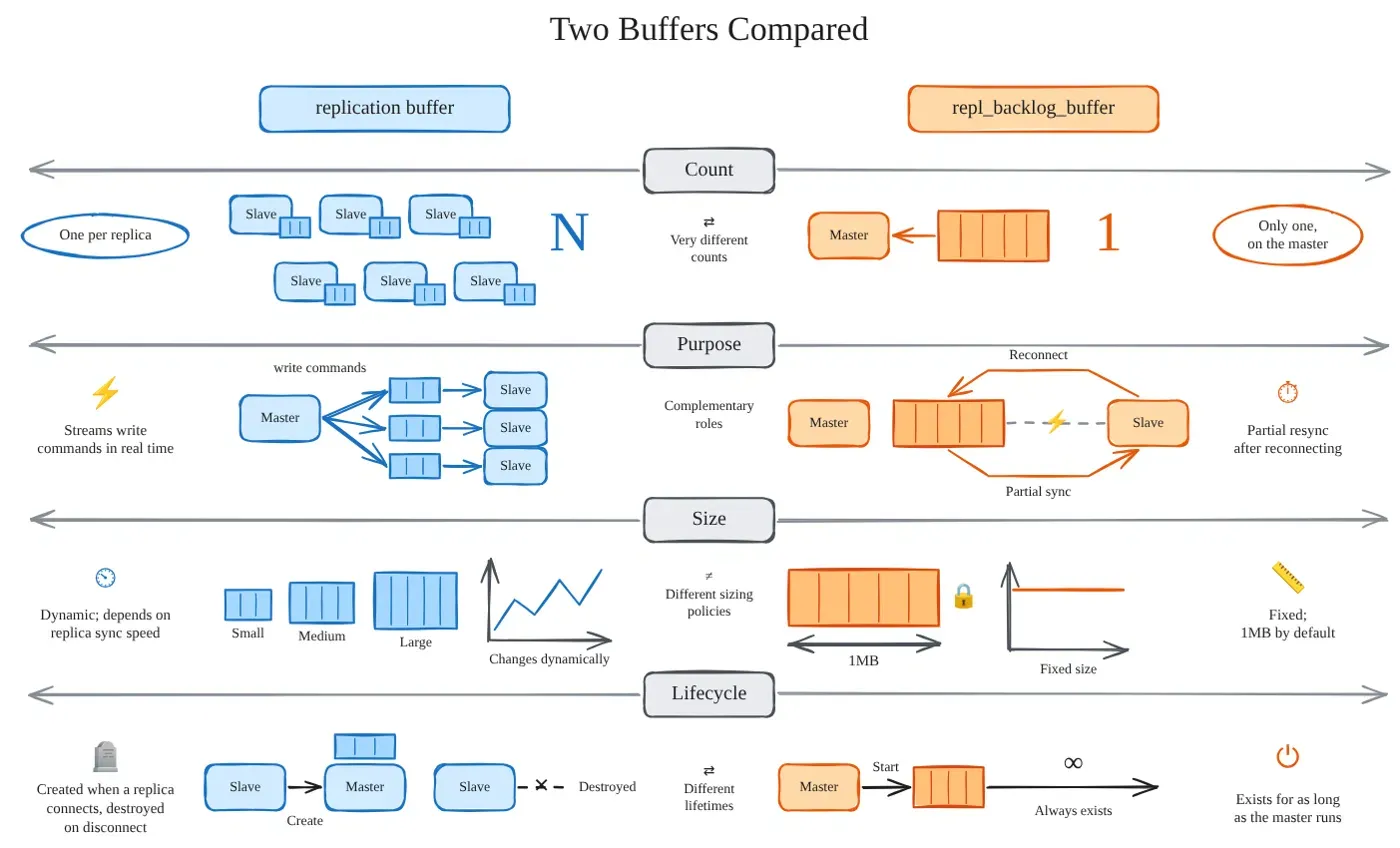
repl_backlog_buffer is a circular buffer with a default size of 1MB. The master writes its write commands into this buffer. Because the size is limited and writes wrap around, once more than 1MB of commands have been written, older data gets overwritten.
Incremental sync also uses the psync command. If the master sees that the runid sent by the replica matches its own, and the offset shows the data is still in repl_backlog_buffer, incremental sync is possible.
The master then looks up the commands after that offset in repl_backlog_buffer, writes them into the replication buffer, and sends them to the replica. The replica executes the commands, and the incremental sync is complete.
If the offset shows the data has already been overwritten, the only option is a full sync.
So you can increase the size of repl_backlog_buffer to avoid full syncs as much as possible.
Difference between replication buffer and repl_backlog_buffer
Many people mix up the replication buffer and the repl_backlog_buffer, but they do completely different jobs.
The replication buffer is for replicas that are currently connected. The master has one buffer per replica. Its size is controlled by client-output-buffer-limit:
client-output-buffer-limit slave 256mb 64mb 60This means that if a replica’s output buffer goes over 256MB, or stays over 64MB for 60 seconds, the connection is closed. After that, the replica has to do a full sync again when it reconnects.
The repl_backlog_buffer is for replicas that reconnect after a disconnection. It is a circular buffer, and when it fills up it overwrites the oldest data. The 1MB default is too small, so in production it’s recommended to increase it:
repl-backlog-size 100mbHow big should it be? It depends on how long a disconnection you want to tolerate. If the master writes 1MB of data per second and you want incremental sync to work for disconnections of up to 100 seconds, set it to 100MB.
The cost of full sync
A full sync is heavy, so avoid it whenever you can:
- The master has to fork a child process to generate the RDB. The main thread blocks during the fork, and with a lot of data this can take tens of milliseconds.
- The RDB file has to be sent over the network. 10GB of data takes at least several tens of seconds to transfer.
- The replica can’t serve requests while it is loading the RDB.
- After the RDB is loaded, the replica still has to replay the commands in the replication buffer
So in production you should do two things. First, increase
repl_backlog_bufferto lower the chance of a full sync. Second, limit how much data a single Redis instance holds; the usual advice is no more than 10GB.
Master–Replica Replication Is Asynchronous
When the master receives a write command, it writes it locally and immediately returns success to the client, without waiting for replicas to finish syncing. This gives high performance but carries a risk: if the master crashes after the write but before it syncs, that data is lost.
Redis 3.0 introduced the WAIT command, which lets a client wait until a given number of replicas have finished syncing:
SET key value
WAIT 1 1000  # wait for at least 1 replica to sync, up to 1000 ms
But this only changes how the client behaves. Redis replication itself is still asynchronous.
How does Redis handle requests when generating an RDB file?
Redis uses the BGSAVE command to generate an RDB snapshot. The core mechanism is to fork a child process. The parent process copies its memory page tables to the child process, which then traverses the data and writes it to disk. Meanwhile, the parent process continues handling client requests.
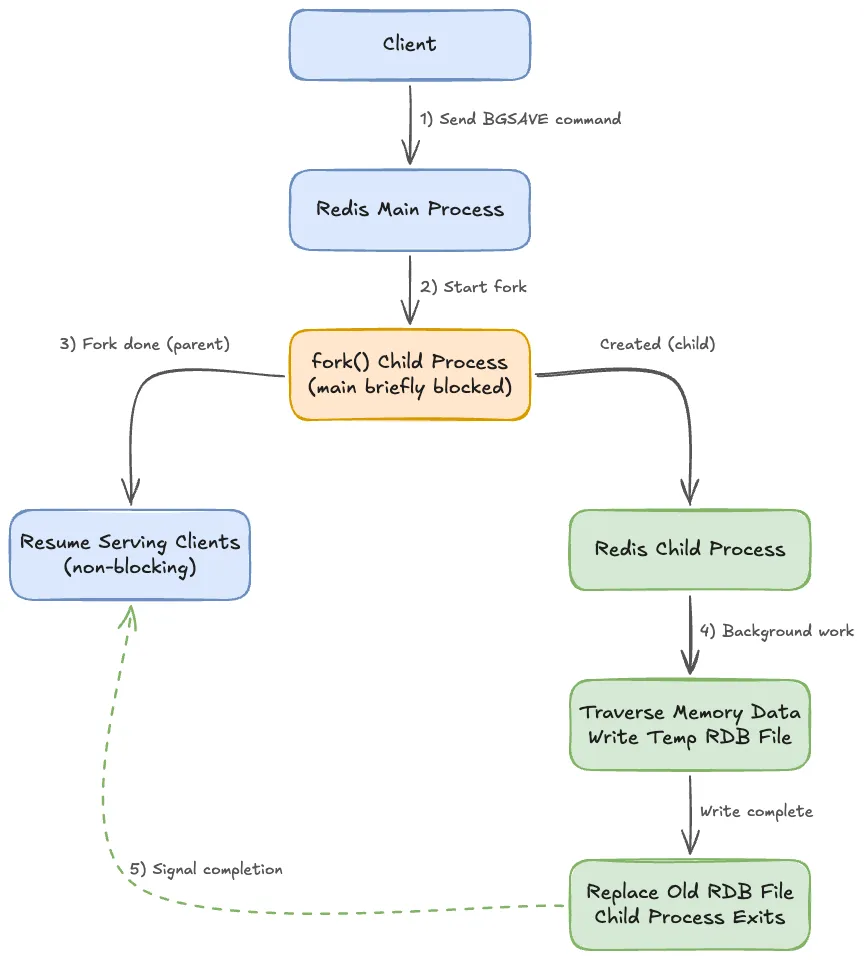 The overall process is as follows:
- The master issues the
BGSAVEcommand. - The main process forks a child process. This step may cause a brief pause.
- Once the fork completes, the main process immediately resumes handling requests normally.
- The child process traverses the in-memory data and writes it to an RDB file in the background.
- After writing the file, the child process exits and notifies the main process that the RDB generation is complete.
Redis continues serving requests while generating an RDB snapshot. There may be a brief, millisecond-level pause during the fork() operation.