Kubernetes Hands on
1. Prerequires Installation
- Install Docker Desktop
- Install Kind
- Install Kubectl
2. Create simple blog and lottery project
mkdir -p blog/views
cd blog
touch main.go views/home.html Dockerfile
go mod init blog
go get github.com/labstack/echo/v5
main.go
package main

import (
	"errors"
	"fmt"
	"html/template"
	"io"
	"net"
	"net/http"
	"os"

	"github.com/labstack/echo/v5"
	"github.com/labstack/echo/v5/middleware"
)

// Get the local network interface IP (private IP)
func GetLocalIP() (ipv4 string, err error) {
	var (
		addrs   []net.Addr
		addr    net.Addr
		ipNet   *net.IPNet // IP address: IPv4 or IPv6
		isIpNet bool
	)
	// Get all network interfaces
	if addrs, err = net.InterfaceAddrs(); err != nil {
		return
	}
	// Get the first non-loopback network interface IP
	for _, addr = range addrs {
		// Check if the network address is an IP address: IPv4 or IPv6
		if ipNet, isIpNet = addr.(*net.IPNet); isIpNet {
			if !ipNet.IP.IsLoopback() {
				if ipNet.IP.IsPrivate() { // Private network address
					// Skip IPv6
					if ipNet.IP.To4() != nil {
						ipv4 = ipNet.IP.String()
						return
					}
				}
			}
		}
	}

	err = errors.New("ERR_NO_LOCAL_IP_FOUND")
	return
}

type Template struct {
	templates *template.Template
}

func (t *Template) Render(c *echo.Context, w io.Writer, name string, data any) error {
	return t.templates.ExecuteTemplate(w, name, data)
}

func main() {
	e := echo.New()
	e.Use(middleware.RequestLogger())
	e.Use(middleware.Recover())
	t := &Template{
		templates: template.Must(template.ParseGlob("views/*.html")),
	}
	e.Renderer = t

	e.GET("/", func(c *echo.Context) error {
		name := c.QueryParam("name")
		project := os.Getenv("project")
		ip, _ := GetLocalIP()

		return c.Render(http.StatusOK, "home.html", map[string]any{
			"name":    name,
			"project": project,
			"ip":      ip,
		})
	})

	port := os.Getenv("port")
	if err := e.Start(fmt.Sprintf(":%s", port)); err != nil {
		e.Logger.Error("failed to start server", "error", err)
	}
}
views/home.html
<h2>
	Hello {{.name}}
	<br />
	This is the {{.project}} system
	<br />
	Server IP: {{.ip}}
</h2>
Dockerfile
FROM golang:latest
ARG port=1323
ARG project=blog
ENV project=$project
ENV port=$port
RUN mkdir /app
WORKDIR /app
COPY . .
RUN go build -o myapp .
EXPOSE $port
CMD ["./myapp"]
Build and Run the docker image
docker build -t blog:latest .
docker run -p 80:1323 blog:latest
Test
curl localhost/?name=fulimOutput:
<h2> Hello fulim <br /> This is the blog system <br /> Server IP: 172.17.0.2 </h2>Create another lottery project with the same step. For more information, check on https://github.com/Fulim13/kubernetes-demo
3. Small Kubernetes Concept
- Nodes consist of control plane node and worker node (compute machine)
- Control Plane node is used to received request from client to manage the worker node
- Worker Node can deploy one or more pod
- A pod can deploy one or more container
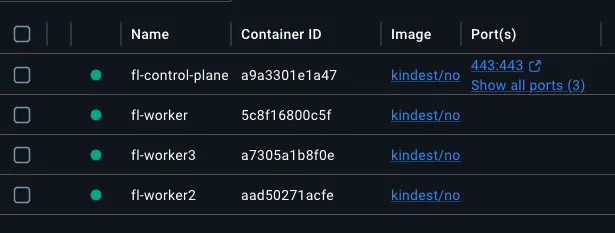
4. Create Cluster (1 control-plane node and 3 worker nodes)
mkdir -p deploy/kind
touch deploy/kind/cluster-fl.yaml
cluster-fl.yaml
kind: Cluster
apiVersion: kind.x-k8s.io/v1alpha4
name: fl                              # name of the cluster
nodes:
  - role: control-plane               # There is logically only one control plane, but there can be multiple physical nodes; usually an odd number, then a proxy will select one of the control plane (for availability, one control pane may down)
    extraPortMappings:                # This is used open host port in local machine to ingress in control plane node
      - containerPort: 80             # port inside the kind node container
        hostPort: 80                  # port on your machine (localhost:hostPort -> node:containerPort)
      - containerPort: 443
        hostPort: 443
  - role: worker
  - role: worker
  - role: worker
Create the cluster with following command
kind create cluster --config deploy/kind/cluster-fl.yamlYou can delete the cluster with
kind delete cluster --name fl
View your Docker Desktop, you shall see 1 control plane node and 3 worker nodes
5. Create Deployment
mkdir -p deploy/k8s
touch deploy/k8s/blog-deployment.yaml
blog-deployment.yaml
apiVersion: apps/v1
kind: Deployment

metadata:
  name:  blog-deployment                # Deployment name
  labels:                               # Deployment labels
    app:  blog

spec:
  replicas: 3                           # Number of pod replicas
  selector:                             # Specify which pod label with blog-deployment to match
    matchLabels:
      app: blog

  template:                             # Pod configuration
    metadata:
      labels:                           # Pod label
        app:  blog
    spec:
      containers:                       # Container in the pod
      - name:  blog                     # Container Name
        image:  blog:latest             # Image to run in the container
        imagePullPolicy: IfNotPresent   # If the Image is not present, it will pull
        resources:                      # Control hardware resources requsted by the Pod
          requests:
            cpu: 10m                    # 1 CPU core = 1000m; 10m = 0.01 CPU
            memory: 10Mi
          limits:
            cpu: 10m
            memory: 10Mi
Load the image from docker to the cluster (where it will load to all nodes inside the cluster)
kind load docker-image blog:latest --name flCreate the deployment with following command
kubectl apply -f deploy/k8s/blog-deployment.yamlGet Pod Info (-o wide to get more info)
kubectl get pod -o wideTest blog service in pod
ip can get from kubectl get pod -o wide command
docker exec fl-control-plane curl <ip>:1323/?name=fulim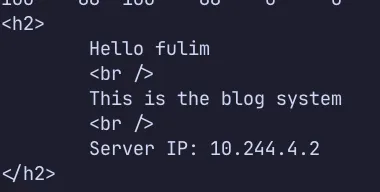
Create another lottery deployment with the same step. For more information, check on https://github.com/Fulim13/kubernetes-demo
6. Create Service
Service in Kubernetes is used for as a fixed IP and a Load Balancer to different pod. You will get what it means by the following example.
If we get the info by kubectl get pod -o wide
 You can see the IP of fl-worker for blog is 10.244.1.2
But once we delete it with
kubectl delete <pod-name>
When we kubectl get pod -o wide, the ip already changes, since Pod are replaceable resources, so it is not good to use pod to expose to ingress(we will learn this information later), it is better to use Service which provide a fixed IP

touch deploy/k8s/blog-service.yamlblog-service.yaml
apiVersion: v1
kind: Service

metadata:
  name: blog-service        # Service Name

spec:
  type: ClusterIP           # Service Type. ClusterIP means the service exposes a virtual IP within the k8s cluster, used to access the service internally. This IP stays fixed regardless of which node the pods run on
  ports:
  - name: http
    protocol: TCP
    port: 1323              # Port used for external access
    targetPort: 1323        # Port used by the pod (application code)
  selector:                 # Which pods this service matches
    app: blog               # Pod Label to match
Deploy the service to cluster:
kubectl apply -f deploy/k8s/blog-service.yamlGet the service info
kubectl get svc
Test blog service in pod with service
ip can get from `kubectl get svc command
docker exec fl-control-plane curl <svc-ip>:1323/?name=fulim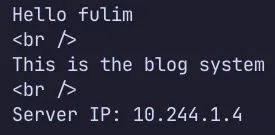 Each time you try it will load balance to different pod
Create another lottery service with the same step. For more information, check on https://github.com/Fulim13/kubernetes-demo
7. Node Selector (Optional)
touch deploy/k8s/node-selector-deployment.yamlnode-selector-deployment.yaml
apiVersion: apps/v1
kind: Deployment

metadata:
+  name:  node-selector-deployment       # Deployment name
  labels:                               # Deployment labels
+    app:  ns

spec:
+  replicas: 1                           # Number of pod replicas
  selector:                             # Specify which pod label with blog-deployment to match
    matchLabels:
+      app: ns

  template:                             # Pod configuration
    metadata:
      labels:                           # Pod label
+        app:  ns
    spec:
+	  nodeSelector:
+        hp: "true"
      containers:                       # Container in the pod
+      - name:  ns                       # Container Name
        image:  blog:latest             # Image to run in the container
        imagePullPolicy: IfNotPresent   # If the Image is not present, it will pull
        resources:                      # Control hardware resources requsted by the Pod
          requests:
            cpu: 10m                    # 1 CPU core = 1000m; 10m = 0.01 CPU
            memory: 10Mi
          limits:
            cpu: 10m
            memory: 10Mi
I create node-selector-deploymen with the above changes, i use back the same blog image but i change the container/pod/deployment label to ns, and i set the replica to 1 and set nodeSelector: hp: "true", this make sure that the deployment only will deploy to the node that label hp=true
But, how do we set the node label
We can do it by the following command To Set node label
kubectl label nodes fl-worker hp=trueNow we set the fl-worker nodes (first worker node) to hp=true, so if we deploy the node-selector-deployment.yaml, a new pod will created on first worder node
To Get Labels from node
kubectl label nodes fl-worker --list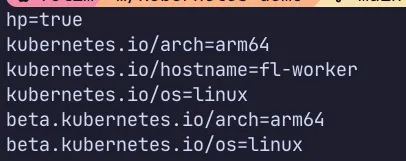
To Get Nodes From Label
kubectl get node -l hp=true
Apply the Deployment
kubectl apply -f deploy/k8s/node-selector-deployment.yamlCheck the pod
kubectl get pod -o wide You can see now the node-selector pod is deploy to the fl-worker (first worker node)
8. Create Ingress
Ingress is used as a gateway to allow outside to access the service and pod
touch deploy/k8s/ingress-controller.yaml
touch deploy/k8s/ingress-nginx.yaml
ingress-controller.yaml
apiVersion: v1
kind: Namespace
metadata:
  labels:
    app.kubernetes.io/instance: ingress-nginx
    app.kubernetes.io/name: ingress-nginx
  name: ingress-nginx
---
apiVersion: v1
automountServiceAccountToken: true
kind: ServiceAccount
metadata:
  labels:
    app.kubernetes.io/component: controller
    app.kubernetes.io/instance: ingress-nginx
    app.kubernetes.io/name: ingress-nginx
    app.kubernetes.io/part-of: ingress-nginx
    app.kubernetes.io/version: 1.11.2
  name: ingress-nginx
  namespace: ingress-nginx
---
apiVersion: v1
automountServiceAccountToken: true
kind: ServiceAccount
metadata:
  labels:
    app.kubernetes.io/component: admission-webhook
    app.kubernetes.io/instance: ingress-nginx
    app.kubernetes.io/name: ingress-nginx
    app.kubernetes.io/part-of: ingress-nginx
    app.kubernetes.io/version: 1.11.2
  name: ingress-nginx-admission
  namespace: ingress-nginx
---
apiVersion: rbac.authorization.k8s.io/v1
kind: Role
metadata:
  labels:
    app.kubernetes.io/component: controller
    app.kubernetes.io/instance: ingress-nginx
    app.kubernetes.io/name: ingress-nginx
    app.kubernetes.io/part-of: ingress-nginx
    app.kubernetes.io/version: 1.11.2
  name: ingress-nginx
  namespace: ingress-nginx
rules:
- apiGroups:
  - ""
  resources:
  - namespaces
  verbs:
  - get
- apiGroups:
  - ""
  resources:
  - configmaps
  - pods
  - secrets
  - endpoints
  verbs:
  - get
  - list
  - watch
- apiGroups:
  - ""
  resources:
  - services
  verbs:
  - get
  - list
  - watch
- apiGroups:
  - networking.k8s.io
  resources:
  - ingresses
  verbs:
  - get
  - list
  - watch
- apiGroups:
  - networking.k8s.io
  resources:
  - ingresses/status
  verbs:
  - update
- apiGroups:
  - networking.k8s.io
  resources:
  - ingressclasses
  verbs:
  - get
  - list
  - watch
- apiGroups:
  - coordination.k8s.io
  resourceNames:
  - ingress-nginx-leader
  resources:
  - leases
  verbs:
  - get
  - update
- apiGroups:
  - coordination.k8s.io
  resources:
  - leases
  verbs:
  - create
- apiGroups:
  - ""
  resources:
  - events
  verbs:
  - create
  - patch
- apiGroups:
  - discovery.k8s.io
  resources:
  - endpointslices
  verbs:
  - list
  - watch
  - get
---
apiVersion: rbac.authorization.k8s.io/v1
kind: Role
metadata:
  labels:
    app.kubernetes.io/component: admission-webhook
    app.kubernetes.io/instance: ingress-nginx
    app.kubernetes.io/name: ingress-nginx
    app.kubernetes.io/part-of: ingress-nginx
    app.kubernetes.io/version: 1.11.2
  name: ingress-nginx-admission
  namespace: ingress-nginx
rules:
- apiGroups:
  - ""
  resources:
  - secrets
  verbs:
  - get
  - create
---
apiVersion: rbac.authorization.k8s.io/v1
kind: ClusterRole
metadata:
  labels:
    app.kubernetes.io/instance: ingress-nginx
    app.kubernetes.io/name: ingress-nginx
    app.kubernetes.io/part-of: ingress-nginx
    app.kubernetes.io/version: 1.11.2
  name: ingress-nginx
rules:
- apiGroups:
  - ""
  resources:
  - configmaps
  - endpoints
  - nodes
  - pods
  - secrets
  - namespaces
  verbs:
  - list
  - watch
- apiGroups:
  - coordination.k8s.io
  resources:
  - leases
  verbs:
  - list
  - watch
- apiGroups:
  - ""
  resources:
  - nodes
  verbs:
  - get
- apiGroups:
  - ""
  resources:
  - services
  verbs:
  - get
  - list
  - watch
- apiGroups:
  - networking.k8s.io
  resources:
  - ingresses
  verbs:
  - get
  - list
  - watch
- apiGroups:
  - ""
  resources:
  - events
  verbs:
  - create
  - patch
- apiGroups:
  - networking.k8s.io
  resources:
  - ingresses/status
  verbs:
  - update
- apiGroups:
  - networking.k8s.io
  resources:
  - ingressclasses
  verbs:
  - get
  - list
  - watch
- apiGroups:
  - discovery.k8s.io
  resources:
  - endpointslices
  verbs:
  - list
  - watch
  - get
---
apiVersion: rbac.authorization.k8s.io/v1
kind: ClusterRole
metadata:
  labels:
    app.kubernetes.io/component: admission-webhook
    app.kubernetes.io/instance: ingress-nginx
    app.kubernetes.io/name: ingress-nginx
    app.kubernetes.io/part-of: ingress-nginx
    app.kubernetes.io/version: 1.11.2
  name: ingress-nginx-admission
rules:
- apiGroups:
  - admissionregistration.k8s.io
  resources:
  - validatingwebhookconfigurations
  verbs:
  - get
  - update
---
apiVersion: rbac.authorization.k8s.io/v1
kind: RoleBinding
metadata:
  labels:
    app.kubernetes.io/component: controller
    app.kubernetes.io/instance: ingress-nginx
    app.kubernetes.io/name: ingress-nginx
    app.kubernetes.io/part-of: ingress-nginx
    app.kubernetes.io/version: 1.11.2
  name: ingress-nginx
  namespace: ingress-nginx
roleRef:
  apiGroup: rbac.authorization.k8s.io
  kind: Role
  name: ingress-nginx
subjects:
- kind: ServiceAccount
  name: ingress-nginx
  namespace: ingress-nginx
---
apiVersion: rbac.authorization.k8s.io/v1
kind: RoleBinding
metadata:
  labels:
    app.kubernetes.io/component: admission-webhook
    app.kubernetes.io/instance: ingress-nginx
    app.kubernetes.io/name: ingress-nginx
    app.kubernetes.io/part-of: ingress-nginx
    app.kubernetes.io/version: 1.11.2
  name: ingress-nginx-admission
  namespace: ingress-nginx
roleRef:
  apiGroup: rbac.authorization.k8s.io
  kind: Role
  name: ingress-nginx-admission
subjects:
- kind: ServiceAccount
  name: ingress-nginx-admission
  namespace: ingress-nginx
---
apiVersion: rbac.authorization.k8s.io/v1
kind: ClusterRoleBinding
metadata:
  labels:
    app.kubernetes.io/instance: ingress-nginx
    app.kubernetes.io/name: ingress-nginx
    app.kubernetes.io/part-of: ingress-nginx
    app.kubernetes.io/version: 1.11.2
  name: ingress-nginx
roleRef:
  apiGroup: rbac.authorization.k8s.io
  kind: ClusterRole
  name: ingress-nginx
subjects:
- kind: ServiceAccount
  name: ingress-nginx
  namespace: ingress-nginx
---
apiVersion: rbac.authorization.k8s.io/v1
kind: ClusterRoleBinding
metadata:
  labels:
    app.kubernetes.io/component: admission-webhook
    app.kubernetes.io/instance: ingress-nginx
    app.kubernetes.io/name: ingress-nginx
    app.kubernetes.io/part-of: ingress-nginx
    app.kubernetes.io/version: 1.11.2
  name: ingress-nginx-admission
roleRef:
  apiGroup: rbac.authorization.k8s.io
  kind: ClusterRole
  name: ingress-nginx-admission
subjects:
- kind: ServiceAccount
  name: ingress-nginx-admission
  namespace: ingress-nginx
---
apiVersion: v1
data:
  allow-snippet-annotations: "false"
kind: ConfigMap
metadata:
  labels:
    app.kubernetes.io/component: controller
    app.kubernetes.io/instance: ingress-nginx
    app.kubernetes.io/name: ingress-nginx
    app.kubernetes.io/part-of: ingress-nginx
    app.kubernetes.io/version: 1.11.2
  name: ingress-nginx-controller
  namespace: ingress-nginx
---
apiVersion: v1
kind: Service
metadata:
  labels:
    app.kubernetes.io/component: controller
    app.kubernetes.io/instance: ingress-nginx
    app.kubernetes.io/name: ingress-nginx
    app.kubernetes.io/part-of: ingress-nginx
    app.kubernetes.io/version: 1.11.2
  name: ingress-nginx-controller
  namespace: ingress-nginx
spec:
  ipFamilies:
  - IPv4
  ipFamilyPolicy: SingleStack
  ports:
  - appProtocol: http
    name: http
    port: 80
    protocol: TCP
    targetPort: http
  - appProtocol: https
    name: https
    port: 443
    protocol: TCP
    targetPort: https
  selector:
    app.kubernetes.io/component: controller
    app.kubernetes.io/instance: ingress-nginx
    app.kubernetes.io/name: ingress-nginx
  type: NodePort
---
apiVersion: v1
kind: Service
metadata:
  labels:
    app.kubernetes.io/component: controller
    app.kubernetes.io/instance: ingress-nginx
    app.kubernetes.io/name: ingress-nginx
    app.kubernetes.io/part-of: ingress-nginx
    app.kubernetes.io/version: 1.11.2
  name: ingress-nginx-controller-admission
  namespace: ingress-nginx
spec:
  ports:
  - appProtocol: https
    name: https-webhook
    port: 443
    targetPort: webhook
  selector:
    app.kubernetes.io/component: controller
    app.kubernetes.io/instance: ingress-nginx
    app.kubernetes.io/name: ingress-nginx
  type: ClusterIP
---
apiVersion: apps/v1
kind: Deployment
metadata:
  labels:
    app.kubernetes.io/component: controller
    app.kubernetes.io/instance: ingress-nginx
    app.kubernetes.io/name: ingress-nginx
    app.kubernetes.io/part-of: ingress-nginx
    app.kubernetes.io/version: 1.11.2
  name: ingress-nginx-controller
  namespace: ingress-nginx
spec:
  minReadySeconds: 0
  revisionHistoryLimit: 10
  selector:
    matchLabels:
      app.kubernetes.io/component: controller
      app.kubernetes.io/instance: ingress-nginx
      app.kubernetes.io/name: ingress-nginx
  strategy:
    rollingUpdate:
      maxUnavailable: 1
    type: RollingUpdate
  template:
    metadata:
      labels:
        app.kubernetes.io/component: controller
        app.kubernetes.io/instance: ingress-nginx
        app.kubernetes.io/name: ingress-nginx
        app.kubernetes.io/part-of: ingress-nginx
        app.kubernetes.io/version: 1.11.2
    spec:
      containers:
      - args:
        - /nginx-ingress-controller
        - --election-id=ingress-nginx-leader
        - --controller-class=k8s.io/ingress-nginx
        - --ingress-class=nginx
        - --configmap=$(POD_NAMESPACE)/ingress-nginx-controller
        - --validating-webhook=:8443
        - --validating-webhook-certificate=/usr/local/certificates/cert
        - --validating-webhook-key=/usr/local/certificates/key
        - --watch-ingress-without-class=true
        - --enable-metrics=false
        - --publish-status-address=localhost
        env:
        - name: POD_NAME
          valueFrom:
            fieldRef:
              fieldPath: metadata.name
        - name: POD_NAMESPACE
          valueFrom:
            fieldRef:
              fieldPath: metadata.namespace
        - name: LD_PRELOAD
          value: /usr/local/lib/libmimalloc.so
        image: registry.k8s.io/ingress-nginx/controller:v1.11.2@sha256:d5f8217feeac4887cb1ed21f27c2674e58be06bd8f5184cacea2a69abaf78dce
        imagePullPolicy: IfNotPresent
        lifecycle:
          preStop:
            exec:
              command:
              - /wait-shutdown
        livenessProbe:
          failureThreshold: 5
          httpGet:
            path: /healthz
            port: 10254
            scheme: HTTP
          initialDelaySeconds: 10
          periodSeconds: 10
          successThreshold: 1
          timeoutSeconds: 1
        name: controller
        ports:
        - containerPort: 80
          hostPort: 80
          name: http
          protocol: TCP
        - containerPort: 443
          hostPort: 443
          name: https
          protocol: TCP
        - containerPort: 8443
          name: webhook
          protocol: TCP
        readinessProbe:
          failureThreshold: 3
          httpGet:
            path: /healthz
            port: 10254
            scheme: HTTP
          initialDelaySeconds: 10
          periodSeconds: 10
          successThreshold: 1
          timeoutSeconds: 1
        resources:
          requests:
            cpu: 100m
            memory: 90Mi
        securityContext:
          allowPrivilegeEscalation: false
          capabilities:
            add:
            - NET_BIND_SERVICE
            drop:
            - ALL
          readOnlyRootFilesystem: false
          runAsNonRoot: true
          runAsUser: 101
          seccompProfile:
            type: RuntimeDefault
        volumeMounts:
        - mountPath: /usr/local/certificates/
          name: webhook-cert
          readOnly: true
      dnsPolicy: ClusterFirst
      nodeSelector:
        ingress-ready: "true"
        kubernetes.io/os: linux
      serviceAccountName: ingress-nginx
      terminationGracePeriodSeconds: 0
      tolerations:
      - effect: NoSchedule
        key: node-role.kubernetes.io/master
        operator: Equal
      - effect: NoSchedule
        key: node-role.kubernetes.io/control-plane
        operator: Equal
      volumes:
      - name: webhook-cert
        secret:
          secretName: ingress-nginx-admission
---
apiVersion: batch/v1
kind: Job
metadata:
  labels:
    app.kubernetes.io/component: admission-webhook
    app.kubernetes.io/instance: ingress-nginx
    app.kubernetes.io/name: ingress-nginx
    app.kubernetes.io/part-of: ingress-nginx
    app.kubernetes.io/version: 1.11.2
  name: ingress-nginx-admission-create
  namespace: ingress-nginx
spec:
  template:
    metadata:
      labels:
        app.kubernetes.io/component: admission-webhook
        app.kubernetes.io/instance: ingress-nginx
        app.kubernetes.io/name: ingress-nginx
        app.kubernetes.io/part-of: ingress-nginx
        app.kubernetes.io/version: 1.11.2
      name: ingress-nginx-admission-create
    spec:
      containers:
      - args:
        - create
        - --host=ingress-nginx-controller-admission,ingress-nginx-controller-admission.$(POD_NAMESPACE).svc
        - --namespace=$(POD_NAMESPACE)
        - --secret-name=ingress-nginx-admission
        env:
        - name: POD_NAMESPACE
          valueFrom:
            fieldRef:
              fieldPath: metadata.namespace
        image: registry.k8s.io/ingress-nginx/kube-webhook-certgen:v1.4.3@sha256:a320a50cc91bd15fd2d6fa6de58bd98c1bd64b9a6f926ce23a600d87043455a3
        imagePullPolicy: IfNotPresent
        name: create
        securityContext:
          allowPrivilegeEscalation: false
          capabilities:
            drop:
            - ALL
          readOnlyRootFilesystem: true
          runAsNonRoot: true
          runAsUser: 65532
          seccompProfile:
            type: RuntimeDefault
      nodeSelector:
        kubernetes.io/os: linux
      restartPolicy: OnFailure
      serviceAccountName: ingress-nginx-admission
---
apiVersion: batch/v1
kind: Job
metadata:
  labels:
    app.kubernetes.io/component: admission-webhook
    app.kubernetes.io/instance: ingress-nginx
    app.kubernetes.io/name: ingress-nginx
    app.kubernetes.io/part-of: ingress-nginx
    app.kubernetes.io/version: 1.11.2
  name: ingress-nginx-admission-patch
  namespace: ingress-nginx
spec:
  template:
    metadata:
      labels:
        app.kubernetes.io/component: admission-webhook
        app.kubernetes.io/instance: ingress-nginx
        app.kubernetes.io/name: ingress-nginx
        app.kubernetes.io/part-of: ingress-nginx
        app.kubernetes.io/version: 1.11.2
      name: ingress-nginx-admission-patch
    spec:
      containers:
      - args:
        - patch
        - --webhook-name=ingress-nginx-admission
        - --namespace=$(POD_NAMESPACE)
        - --patch-mutating=false
        - --secret-name=ingress-nginx-admission
        - --patch-failure-policy=Fail
        env:
        - name: POD_NAMESPACE
          valueFrom:
            fieldRef:
              fieldPath: metadata.namespace
        image: registry.k8s.io/ingress-nginx/kube-webhook-certgen:v1.4.3@sha256:a320a50cc91bd15fd2d6fa6de58bd98c1bd64b9a6f926ce23a600d87043455a3
        imagePullPolicy: IfNotPresent
        name: patch
        securityContext:
          allowPrivilegeEscalation: false
          capabilities:
            drop:
            - ALL
          readOnlyRootFilesystem: true
          runAsNonRoot: true
          runAsUser: 65532
          seccompProfile:
            type: RuntimeDefault
      nodeSelector:
        kubernetes.io/os: linux
      restartPolicy: OnFailure
      serviceAccountName: ingress-nginx-admission
---
apiVersion: networking.k8s.io/v1
kind: IngressClass
metadata:
  labels:
    app.kubernetes.io/component: controller
    app.kubernetes.io/instance: ingress-nginx
    app.kubernetes.io/name: ingress-nginx
    app.kubernetes.io/part-of: ingress-nginx
    app.kubernetes.io/version: 1.11.2
  name: nginx
spec:
  controller: k8s.io/ingress-nginx
---
apiVersion: admissionregistration.k8s.io/v1
kind: ValidatingWebhookConfiguration
metadata:
  labels:
    app.kubernetes.io/component: admission-webhook
    app.kubernetes.io/instance: ingress-nginx
    app.kubernetes.io/name: ingress-nginx
    app.kubernetes.io/part-of: ingress-nginx
    app.kubernetes.io/version: 1.11.2
  name: ingress-nginx-admission
webhooks:
- admissionReviewVersions:
  - v1
  clientConfig:
    service:
      name: ingress-nginx-controller-admission
      namespace: ingress-nginx
      path: /networking/v1/ingresses
  failurePolicy: Fail
  matchPolicy: Equivalent
  name: validate.nginx.ingress.kubernetes.io
  rules:
  - apiGroups:
    - networking.k8s.io
    apiVersions:
    - v1
    operations:
    - CREATE
    - UPDATE
    resources:
    - ingresses
  sideEffects: None
In above ingress-controller.yaml, there is a node-selector = ingress-ready = true, so we need to label our control plane as ingress-ready = true to make this ingress-controller deploy on control plane node
ingress-nginx.yaml
apiVersion: networking.k8s.io/v1
kind: Ingress
metadata:
  name: example-ingress
  annotations:
    nginx.ingress.kubernetes.io/rewrite-target: /
spec:
  rules:
  - http:
      paths:
      - path: /blog
        pathType: Prefix
        backend:
          service:
            name: blog-service
            port:
              number: 1323      # the service's working port number
      - path: /lottery
        pathType: Prefix
        backend:
          service:
            name: lottery-service
            port:
              number: 1324      # the service's working port number
Since in cluster-fl, control plane with extraPortMapping, it already open up port 80 and 443, hence, ingress controller deploy on control plane can redirect 80 or 443 request from host to /blog to blog-service and /lottery to lottery-service
Add ingress-ready: “true” label to control plane node
kubectl label nodes fl-control-plane ingress-ready=trueApply ingress-controller deployment
kubectl apply -f deploy/k8s/ingress-controller.yamlView Port Detail
kubectl get pod -n ingress-nginx -o wideYou can see the ingress-controller is in the control plane node

Apply ingress-nginx deployment
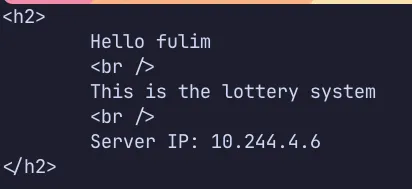
kubectl apply -f deploy/k8s/ingress-nginx.yamlTest the /blog and /lottery endpoint
curl localhost/blog?name=fulim
curl localhost/lottery?name=fulim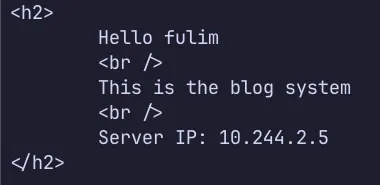
9. HPA (Auto-Scaling) (Optional)
HPA can auto scale the pod based on the cpu usage
Install Metric Server
wget -O deploy/k8s/metrics-server.yaml https://github.com/kubernetes-sigs/metrics-server/releases/latest/download/components.yamlAdd - --kubelet-insecure-tls after --metric-resolution=15s line in metric-server.yaml to allow insecure-tls, else metric server will not able to spin up
Create blog-hpa.yaml
touch deploy/k8s/blog-hpa.yamlblog-hpa.yaml
apiVersion: autoscaling/v1
kind: HorizontalPodAutoscaler
metadata:
  name: blog-hpa
spec:
  minReplicas: 3                      # min 3 replicas
  maxReplicas: 5                      # max 5 replicas
  scaleTargetRef:                     # describes which target to monitor
    apiVersion: apps/v1
    kind: Deployment
    name: blog-deployment
  targetCPUUtilizationPercentage: 50    # auto-scale when CPU utilization reaches 50% of its allocated amount (in this case 5m of 10m for 3 pods)
Apply the Metric server and blog-hpa
kubectl apply -f deploy/k8s/metrics-server.yaml
kubectl apply -f deploy/k8s/blog-hpa.yaml
Get Metric pod info
kubectl get pod -o wide -n kube-system | grep metrics
Get HPA
kubectl get hpa
Get Blog Pod (Because we use blog-deployment pod to auto scale)
kubectl get pod | grep blogCurrent blog pod is 3

touch stress_test.shstress_test.sh
#!/bin/bash

i=0
while [ true ]
do
  let i++
  curl localhost/blog
done
Run the stress test
bash ./stress_test.shGet HPA
kubectl get hpa
Get Blog Pod
kubectl get pod | grep blogYou can see the blog pod scale from 3 to 5

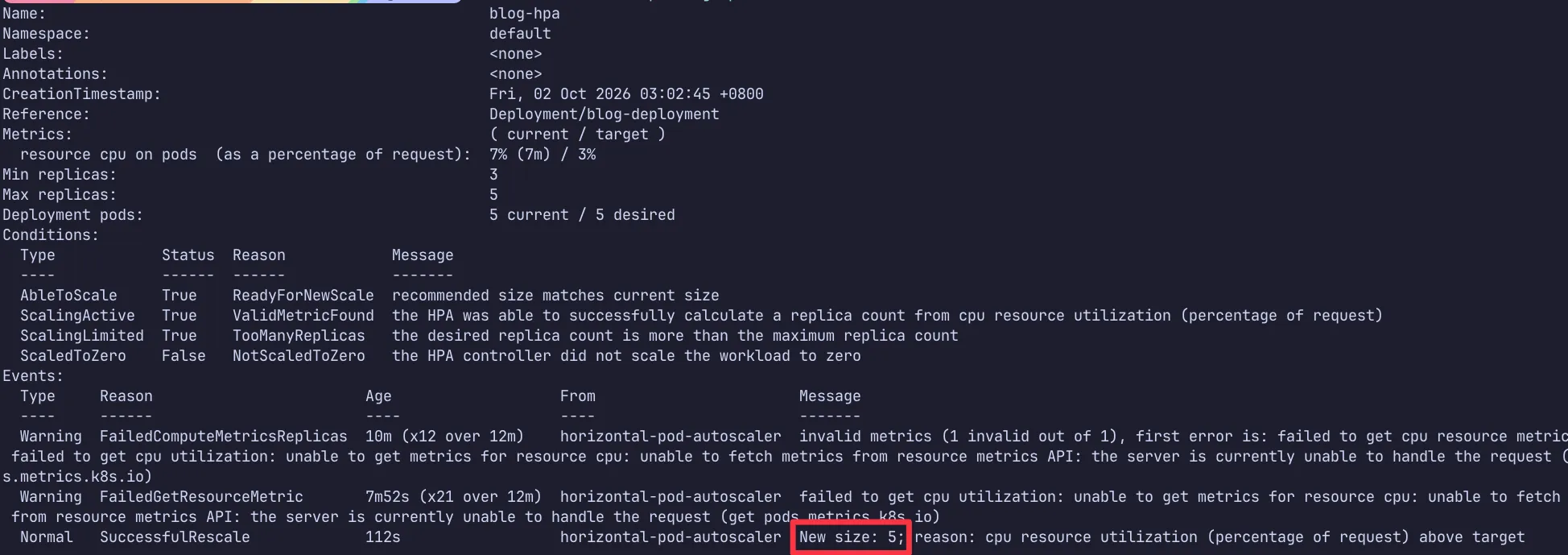
Check HPA Scaling Activity
kubectl describe hpa blog-hpa