Go Concurrency Hands On, From Goroutine to Context
This is a hands-on walkthrough of Go concurrency. Every section maps to one folder in the repo, so you can run it yourself with go run <folder>/main.go and see the output.
We start with the simplest goroutine, then learn how to wait for goroutines, how to protect shared data, how to communicate with channels, and finally how to control goroutines with select and context.
1. Project Setup
go-concurrency/
├── 01_simple_goroutine/
├── 02_goroutine_lifecycle/
├── 03_waitgroup/
├── 04_errgroup/              # own module (golang.org/x/sync)
├── 05_atomic/
├── 06_rwlock/
├── 07_collection_safety/
├── 08_concurrent_map/        # own module, run with go test
├── 09_recover_in_goroutine/
├── 10_traverse_channel/
├── 11_block_deadlock/
├── 12_channel_as_signal/
├── 13_cond/
├── 14_mpg/                   # theory: GMP model
├── 15_process_and_thread/    # theory: process vs thread vs goroutine
├── 16_qps_limit/
├── 17_select/
└── 18_context/
Each folder is one small topic. Most folders only have a main.go, and inside main() you comment / uncomment the function you want to try.
wg.Go()is used a lot in this post. It needs Go 1.25+.
2. Goroutine Basics
a. Simple Goroutine
01_simple_goroutine/main.go
func Add(x, y int) int {
	fmt.Println("Add")
	return x + y
}

var product = func(x, y int) int {
	fmt.Println("Product")
	return x * y
}

func SimpleGoroutine() {
	fmt.Printf("Number of logical processors (CPU Cores): %d\n", runtime.NumCPU())
	runtime.GOMAXPROCS(runtime.NumCPU() / 2) // set the max number of CPU Cores that current process can use
	fmt.Printf("Number of existing goroutines (Initial): %d\n", runtime.NumGoroutine()) // 1 (main function)

	// call function
	go Add(1, 2)

	// anonymous go function
	go func(x, y int) int {
		fmt.Println("Subtract")
		return x - y
	}(3, 1)

	// call function variable
	go product(2, 4)

	// goroutines > CPU cores still can run, they all share the same CPU cores
	for i := 0; i < 20; i++ {
		go Add(1, 2)
	}

	fmt.Printf("Number of existing goroutines: %d\n", runtime.NumGoroutine()) // 24
	time.Sleep(1 * time.Millisecond)
}
Just put go in front of a function call, and it runs in a new goroutine. It works with normal function, anonymous function, and function variable.
go run 01_simple_goroutine/main.go

# Output:
# Number of logical processors (CPU Cores): 15
# Number of existing goroutines (Initial): 1
# Number of existing goroutines: 24
# Add ... Product  Subtract (order might be different)
24 = 1 main goroutine + 3 goroutines + 20 goroutines in the loop. The print order is random because the scheduler decides who runs first.
Notice the time.Sleep at the end. Without it, main returns immediately and all other goroutines are killed, so you may see nothing printed.
b. Goroutine Lifecycle
02_goroutine_lifecycle/main.go
func SubRoutine() {
	go child()
	time.Sleep(5 * time.Second)
}

func child() {
	fmt.Println("child begin")
	go grandChild()
	time.Sleep(100 * time.Millisecond)
	fmt.Println("child finish")
}

func grandChild() {
	fmt.Println("grandChild begin")
	fmt.Printf("Number of Goroutine (Before): %d\n", runtime.NumGoroutine()) // 3
	time.Sleep(3 * time.Second)
	fmt.Printf("Number of Goroutine (After): %d\n", runtime.NumGoroutine()) // 2
	fmt.Println("grandChild finish")
}
go run 02_goroutine_lifecycle/main.go
# Output:
# child begin
# grandChild begin
# Number of Goroutine (Before): 3
# child finish
# Number of Goroutine (After): 2
# grandChild finishAfter child finishes, grandChild keeps running. There is no parent-child relationship between goroutines. All goroutines are equal and independent, one goroutine cannot control another goroutine’s lifetime. The only exception is the main goroutine: when main exits, the whole program exits.
3. Waiting for Goroutines
Using time.Sleep to wait is guessing. We need a proper way to wait.
a. WaitGroup
03_waitgroup/main.go
func WaitGroup() {
	const N = 10
	wg := sync.WaitGroup{}
	wg.Add(N)
	for i := 0; i < N; i++ {
		go func(x, y int) { // open N goroutines
			defer wg.Done() // minus 1
			time.Sleep(10 * time.Millisecond)
			_ = x + y
		}(i, i+1)
	}
	fmt.Printf("Number of Goroutine (Before): %d\n", runtime.NumGoroutine()) // N + 1
	wg.Wait()                                                                // wait until counter is 0
	fmt.Printf("Number of Goroutine (After): %d\n", runtime.NumGoroutine())  // 1
}
WaitGroup is a counter:
Add(n)add n to the counterDone()minus 1Wait()block until the counter becomes 0
Since Go 1.25, there is wg.Go(), which does the Add(1) + defer Done() for you
func WaitGroup2() {
	const N = 10
	wg := sync.WaitGroup{}
	for i := 0; i < N; i++ {
		wg.Go(func() {
			time.Sleep(10 * time.Millisecond)
		})
	}
	wg.Wait()
}
// wg.Go(f) is the same as
wg.Add(1)
go func() {
defer wg.Done()
f()
}()go run 03_waitgroup/main.go
# Output (WaitGroup and WaitGroup2):
# Number of Goroutine (Before): 11
# Number of Goroutine (After): 1b. errgroup
WaitGroup can’t tell you if a goroutine failed. errgroup is a WaitGroup that also collects the error.
cd 04_errgroup
go get golang.org/x/sync/errgroup
04_errgroup/main.go
func main() {
	var group errgroup.Group

	group.Go(func() error {
		time.Sleep(100 * time.Millisecond)
		fmt.Println("hello")
		return nil
	})

	group.Go(func() error {
		time.Sleep(80 * time.Millisecond)
		fmt.Println("hello")
		return errors.New("sorry")
	})

	group.Go(func() error {
		time.Sleep(50 * time.Millisecond)
		fmt.Println("hello")
		return errors.New("ops")
	})

	err := group.Wait()
	fmt.Println("wait result ", err)
}
go run main.go
# Output:
# hello
# hello
# hello
# wait result opsWait() still waits for all goroutines, but only returns the first error. ops comes back after 50ms, which is earlier than sorry (80ms), so we get ops.
4. Data Race and Lock
a. Atomic
When multiple goroutines read and write the same variable at the same time, we get a data race.
n++ looks like one step, but it’s actually 3 steps: load n, plus 1, store back.
Goroutine 1              Goroutine 2
a = n     (a=0)  (1)     a = n     (a=0)  (2)
b = a + 1 (b=1)  (3)     b = a + 1 (b=1)  (5)
n = b     (n=1)  (4)     n = b     (n=1)  (6)

n++ twice, but n = 1 (lost update)
05_atomic/main.go
var n int32 = 0

func inc1() {
	n++ // not atomic, 3 steps
}

func inc2() {
	atomic.AddInt32(&n, 1) // atomic operation
}

func NotAtomic() {
	const P = 1000 // need around 1000 goroutines to see the lost update
	wg := sync.WaitGroup{}
	for i := 0; i < P; i++ {
		wg.Go(func() {
			inc1()
		})
	}
	wg.Wait()
	fmt.Printf("NotAtomic Finally n=%d\n", n)
}

func Atomic() {
	const P = 1000
	wg := sync.WaitGroup{}
	for i := 0; i < P; i++ {
		wg.Go(func() {
			inc2()
		})
	}
	wg.Wait()
	fmt.Printf("Atomic Finally n=%d\n", n)
}
go run 05_atomic/main.go
# Output:
# NotAtomic Finally n=959 (vary every run)
# ===========
# Atomic Finally n=1000
go run -race 05_atomic/main.go
# Found 2 data race(s)Tip: don’t rely on 1000 goroutines to find a bug. Run with
go run -raceorgo test -race, the race detector will report it for you.
b. Mutex
Atomic only works for simple numbers. For anything bigger, use a lock.
06_rwlock/main.go
var n int32 = 0
var lock sync.Mutex

func inc() {
	lock.Lock()   // add write lock
	n++           // only one goroutine can be in this critical region at any time
	lock.Unlock() // release write lock
}
With 1000 goroutines, the result is always Lock Finally n=1000.
c. RWMutex
Most of the time, we read more than we write. Many readers at the same time is safe, so sync.RWMutex has 2 locks:
| Another goroutine wants RLock | Another goroutine wants Lock | |
|---|---|---|
| I hold RLock | ✅ Allowed | ❌ Blocked |
| I hold Lock | ❌ Blocked | ❌ Blocked |
06_rwlock/main.go
var mu = sync.RWMutex{}

func RLockExclusion1() {
	mu.RLock()
	defer mu.RUnlock()

	go func() {
		time.Sleep(100 * time.Millisecond)
		mu.RLock()
		defer mu.RUnlock()
		fmt.Println("child goroutine get the read lock")
	}()

	time.Sleep(1 * time.Second)
}
// Output: child goroutine get the read lock
Read + Read, no problem.
func RLockExclusion2() {
	mu.RLock()
	defer mu.RUnlock()

	go func() {
		mu.Lock()
		defer mu.Unlock()
		fmt.Println("child goroutine get the write lock")
	}()

	go func() {
		time.Sleep(100 * time.Millisecond)
		mu.RLock()
		defer mu.RUnlock()
		fmt.Println("child goroutine get the read lock")
	}()

	time.Sleep(1 * time.Second)
}
// Output: nothing
This one is interesting. The write lock is blocked because main holds the read lock, makes sense. But why the second read lock also blocked? Because a writer is waiting. Once a writer is waiting, new readers must queue behind it. This prevents the writer from starving forever.
func RLockExclusion3() {
	mu.RLock()

	go func() {
		mu.Lock()
		defer mu.Unlock()
		fmt.Println("child goroutine get the write lock")
	}()

	go func() {
		time.Sleep(100 * time.Millisecond)
		mu.RLock()
		defer mu.RUnlock()
		fmt.Println("child goroutine get the read lock")
	}()

	time.Sleep(1 * time.Second)
	mu.RUnlock()
	time.Sleep(1 * time.Second)
}
// Output:
// child goroutine get the write lock
// child goroutine get the read lock
When main releases the read lock, the waiting writer goes first, then the reader.
d. Reentrant Lock
// read lock can be acquired again by the same goroutine
func ReentranceRLock(n int) {
	mu.RLock()
	defer mu.RUnlock()
	fmt.Println(n)
	if n > 0 {
		ReentranceRLock(n - 1)
	}
}
// Output: 3 2 1 0

// write lock is NOT reentrant
func ReentranceWLock(n int) {
	mu.Lock()
	defer mu.Unlock()
	fmt.Println(n)
	if n > 0 {
		ReentranceWLock(n - 1) // wait for the lock that I'm holding myself
	}
}
// Output:
// 3
// fatal error: all goroutines are asleep - deadlock!
Careful: a
fatal erroris not apanic,recover()can’t save you.
5. Collection Safety
07_collection_safety/main.go
var arr = [10]int{}
var mp = make(map[int]bool, 10)
var m = sync.Map{}

func CollectionSafety() {
	wg := sync.WaitGroup{}
	wg.Go(func() { // write even index
		for i := 0; i < len(arr); i += 2 {
			arr[i] = 0
		}
	})
	wg.Go(func() { // write odd index
		for i := 1; i < len(arr); i += 2 {
			arr[i] = 1
		}
	})
	wg.Wait()
	fmt.Println(arr) // [0 1 0 1 0 1 0 1 0 1]

	// fatal error: concurrent map writes
	// wg.Go(func() {
	// 	for i := 0; i < 10000; i += 2 {
	// 		mp[i] = true
	// 	}
	// })
	// wg.Go(func() {
	// 	for i := 1; i < 10000; i += 2 {
	// 		mp[i] = false
	// 	}
	// })

	wg.Go(func() { m.Store("k1", "v1") })
	wg.Go(func() { m.Store("k1", "v2") })
	wg.Wait()
	if v, exists := m.Load("k1"); exists {
		fmt.Println(v) // v1 or v2
	}
}- Array, slice, struct: concurrent write won’t crash. If goroutines write different index / different field, it’s fine. If they write the same element, you get dirty data (data race).
- Map: concurrent write can trigger
fatal error: concurrent map writes, and it kills the whole process.recover()can’t catch it. - To write a map concurrently, use
sync.Map, or protect a normal map withsync.Mutex/sync.RWMutex.
6. Build Your Own Concurrent Map
sync.Map uses any, so you lose type safety. Let’s build a generic one with RWMutex.
08_concurrent_map/concurrent_map.go
package concurrentmap

import "sync"

type ConcurrentMap[K comparable, V any] struct {
	data map[K]V
	mu   sync.RWMutex
}

func NewConcurrentMap[K comparable, V any](cap int) *ConcurrentMap[K, V] {
	return &ConcurrentMap[K, V]{
		data: make(map[K]V, cap),
	}
}

func (cm *ConcurrentMap[K, V]) Store(key K, value V) {
	cm.mu.Lock()
	defer cm.mu.Unlock()
	cm.data[key] = value
}

func (cm *ConcurrentMap[K, V]) Load(key K) (value V, exists bool) {
	cm.mu.RLock()
	defer cm.mu.RUnlock()
	value, exists = cm.data[key]
	return
}
The receiver must be a pointer *ConcurrentMap. If it was a value receiver, every method call copies the struct, including the mutex, and every call would lock its own copy, which protects nothing.
08_concurrent_map/concurrency_test.go
func TestConcurrency(t *testing.T) {
	cm := NewConcurrentMap[int, bool](50)
	const P = 10
	wg := sync.WaitGroup{}
	for i := 0; i < P; i++ {
		wg.Go(func() {
			for j := 0; j < 1000; j++ {
				cm.Store(j, true)
			}
		})
	}
	wg.Wait()
}
cd 08_concurrent_map
go test -v . -run '^TestConcurrentMap$'
go test -v . -run '^TestConcurrency$'10 goroutines writing 1000 keys each, no more concurrent map writes.
7. Recover in Goroutine
09_recover_in_goroutine/main.go
var table = []int{1, 2, 3, 4, 5, 6, 7}

func GetHandler(index int) int {
	// recover only catch the panic from current goroutine
	defer func() {
		recover()
	}()
	return table[index] // index out of range if index >= 7
}

func main() {
	// this recover CANNOT catch the panic in GetHandler, because it runs in another goroutine
	defer func() {
		recover()
	}()
	go GetHandler(10)
	time.Sleep(time.Second)
}
recover() only catches the panic from its own goroutine. If you remove the recover() inside GetHandler, the program crashes even though main has a recover().
So every goroutine you start (especially in a server handler) should have its own defer recover(), otherwise one bad request can take down the whole service.
8. Channel
a. Buffered Channel Blocking
10_traverse_channel/main.go
var ch = make(chan int, 2) // buffered channel, capacity 2

func ChannelBlock() {
	go func() {
		time.Sleep(time.Second)
		if v, ok := <-ch; ok {
			fmt.Println("Take ", v)
		}
		time.Sleep(time.Second)
		if v, ok := <-ch; ok {
			fmt.Println("Take ", v)
		}
	}()

	ch <- 1
	fmt.Println("Send 1")
	ch <- 2
	fmt.Println("Send 2")
	ch <- 3 // blocking, buffer is full
	fmt.Println("Send 3")
	time.Sleep(2 * time.Second)
}

// Output:
// Send 1
// Send 2
// Take 1 (after 1 sec)
// Send 3 (after 1 sec)
// Take 2 (after 2 sec)- Send blocks when the buffer is full
- Receive blocks when the buffer is empty
b. Close Channel
func CloseChannel() {
	ch <- 1
	go func() {
		time.Sleep(3 * time.Second)
		ch <- 2
	}()
	// close(ch)
	v, ok := <-ch
	fmt.Println(v, ok) // 1 true
	v, ok = <-ch       // block 3 sec if channel is not closed
	fmt.Println(v, ok)
	ch <- 3 // if closed: panic: send on closed channel
}

// Output:
// 1 true
// 0 false (if close channel)
// 2 true  (if not close channel, after 3 sec)
After close(ch):
- Read still returns the remaining values first
- After it’s empty, read returns immediately with zero value and
ok = false - Write causes
panic: send on closed channel
c. Traverse Channel
func TraverseChannel() {
	ch <- 1
	ch <- 2
	close(ch) // without close, range waits forever -> deadlock

	// Method 1
	for ele := range ch {
		fmt.Println(ele)
	}

	// Method 2
	// for {
	// 	if v, ok := <-ch; ok {
	// 		fmt.Println(v)
	// 	} else {
	// 		break
	// 	}
	// }
}

// Output:
// 1
// 2
for range on a channel only stops when the channel is closed. So the sender should always close the channel when it’s done sending.
9. Blocking and Deadlock
11_block_deadlock/main.go
There are 6 common ways to block a goroutine
// 1. time.Sleep (unblocks by itself after the time)
time.Sleep(time.Second)

// 2. WaitGroup that never reaches 0
wg := sync.WaitGroup{}
wg.Add(1)
wg.Wait()

// 3. Read from an empty channel
ch := make(chan int, 10)
<-ch

// 4. Range over a channel that is never closed
for ele := range ch {
	fmt.Println(ele)
}

// 5. Lock a mutex that is already locked
mu := sync.Mutex{}
mu.Lock()
mu.Lock()

// 6. Empty select
select {}
So when do we get a deadlock? When all alive goroutines are blocked (except blocked by time.Sleep, because sleep will wake up by itself).
func Block2() {
	go func() {
		time.Sleep(5 * time.Hour)
	}()

	wg := sync.WaitGroup{}
	wg.Add(1)
	wg.Wait()
	fmt.Println("Wait Over")
}
// No deadlock error, just hangs for 5 hours
// because another goroutine is still alive (sleeping)

func DeadLock() {
	ch := make(chan int, 10)
	<-ch
}
// fatal error: all goroutines are asleep - deadlock!
// main is the only goroutine, and it's blocked

func DeadLock2() {
	go func() {
		time.Sleep(5 * time.Second)
	}()

	wg := sync.WaitGroup{}
	wg.Add(1)
	wg.Wait()
}
// fatal error: deadlock (after 5 sec)
// after the sleeping goroutine ends, only main is left and it's blocked
Go only detects deadlock when every goroutine is stuck. In a real server, there are always some background goroutines alive, so a stuck goroutine just hangs silently (goroutine leak). The runtime won’t warn you.
10. Channel as Signal
Use chan struct{} when you only care about the signal, not the data. struct{} takes 0 bytes.
a. Broadcast
12_channel_as_signal/main.go
func Broadcast() {
	ch := make(chan struct{})

	const P = 3
	for i := 0; i < P; i++ {
		go func() {
			<-ch // blocking
			fmt.Printf("%d Start\n", i)
		}()
	}

	time.Sleep(2 * time.Second)
	fmt.Println("Guys we can start")
	close(ch) // broadcast
	time.Sleep(time.Second)
}

// Output:
// Guys we can start (after 2 sec)
// 0 Start
// 1 Start
// 2 Start (order might be different)
Remember from section 8: reading a closed channel returns immediately. So close(ch) wakes up every goroutine waiting on it. That’s a broadcast.
b. CountDownLatch
func CountDownLatch() {
	ch := make(chan struct{})

	const P = 3
	for i := 0; i < P; i++ {
		go func() {
			time.Sleep(time.Duration(i) * time.Second)
			fmt.Printf("%d completed its job\n", i)
			ch <- struct{}{}
		}()
	}

	// act like WaitGroup
	for i := 0; i < P; i++ {
		<-ch
	}

	fmt.Println("All Completed, I will start now")
}

// Output:
// 0 completed its job (immediately)
// 1 completed its job (after 1 sec)
// 2 completed its job (after 2 sec)
// All Completed, I will start now
Each worker sends one signal, main receives P times. Same idea as WaitGroup, built with a channel.
11. sync.Cond
sync.Cond is another way to send signals between goroutines. Let’s compare it with channel.
a. Signal (wake up one)
13_cond/main.go
func CondSignal() {
	mu := sync.Mutex{}
	cond := sync.NewCond(&mu)
	wg := sync.WaitGroup{}

	wg.Go(func() {
		time.Sleep(time.Second)
		cond.Signal() // only 1 waiting goroutine will receive the signal
		fmt.Println("Send Signal")

		time.Sleep(time.Second)
		cond.Signal()
		fmt.Println("Send Signal")
	})

	wg.Go(func() {
		cond.L.Lock() // Wait() will Unlock inside, so must Lock before Wait
		cond.Wait()
		fmt.Println("Receive signal, execute something")
		cond.L.Unlock()

		cond.L.Lock()
		cond.Wait()
		fmt.Println("Receive signal, execute something")
		cond.L.Unlock()
	})

	wg.Wait()
}

// Output:
// Send Signal
// Receive signal, execute something
// Send Signal
// Receive signal, execute something
The key thing: Signal() is not remembered. If nobody is waiting at the moment you call Signal(), the signal is lost. If you add time.Sleep(2 * time.Second) before the second Wait(), the second signal is sent before the goroutine waits, so it waits forever, and wg.Wait() in main also waits forever, deadlock.
The same thing with a buffered channel
func ChannelSignal() {
	ch := make(chan struct{}, 100)
	wg := sync.WaitGroup{}

	wg.Go(func() {
		time.Sleep(time.Second)
		ch <- struct{}{}
		fmt.Println("Send Signal")

		time.Sleep(time.Second)
		ch <- struct{}{}
		fmt.Println("Send Signal")
	})

	wg.Go(func() {
		<-ch
		fmt.Println("Receive signal, execute something")

		time.Sleep(2 * time.Second) // still able to receive, signal is kept in the buffer
		<-ch
		fmt.Println("Receive signal, execute something")
	})

	wg.Wait()
}
A buffered channel keeps the signal in the buffer, so the receiver can come late.
b. Broadcast (wake up all)
func CondBroadcast() {
	mu := sync.Mutex{}
	cond := sync.NewCond(&mu)
	wg := sync.WaitGroup{}

	wg.Go(func() {
		time.Sleep(time.Second)
		cond.Broadcast() // all waiting goroutines receive the signal
		fmt.Println("Broadcast message")

		time.Sleep(time.Second)
		cond.Broadcast()
		fmt.Println("Broadcast message")
	})

	for i := 0; i < 3; i++ {
		wg.Go(func() {
			cond.L.Lock()
			cond.Wait()
			fmt.Println("Receive signal, execute something")
			cond.L.Unlock()

			cond.L.Lock()
			cond.Wait()
			fmt.Println("Receive signal, execute something")
			cond.L.Unlock()
		})
	}
	wg.Wait()
}

// Output:
// Broadcast message
// Receive signal, execute something  (x3)
// Broadcast message
// Receive signal, execute something  (x3)
func ChannelBroadcast() {
ch := make(chan struct{})
wg := sync.WaitGroup{}
wg.Go(func() {
time.Sleep(time.Second)
close(ch)
fmt.Println("Broadcast message")
})
for i := 0; i < 3; i++ {
wg.Go(func() {
time.Sleep(2 * time.Second) // start waiting AFTER the close
<-ch
fmt.Println("Receive signal, execute something")
})
}
wg.Wait()
}The receivers start waiting 1 second after close(ch), but they still receive, because a closed channel stays closed.
sync.Cond |
Channel | |
|---|---|---|
| Wake up one | Signal() |
ch <- struct{}{} |
| Wake up all | Broadcast() |
close(ch) |
| Broadcast multiple times | ✅ Yes | ❌ No, can only close once |
| Signal sent before waiting | Lost | Kept (buffer / closed state) |
So close(ch) is a one-time broadcast, cond.Broadcast() can be repeated. But Cond is easy to get wrong, in most cases channel is enough.
12. Process, Thread and Goroutine
Now let’s take a break from code and see why goroutines are so cheap.
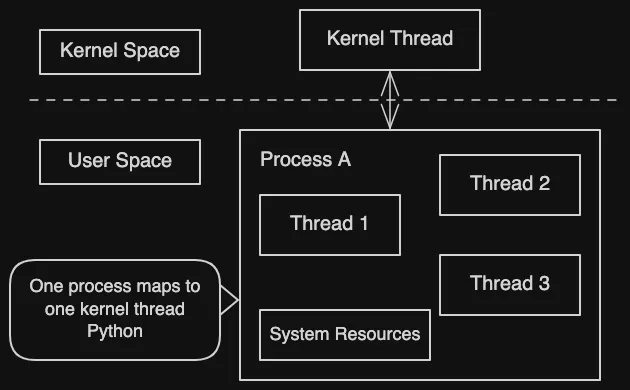
- In languages like Python, one process only maps to 1 kernel thread
- Kernel threads are provided by the operating system. Any parallelism, in any programming language, at the OS level, comes down to parallelism of kernel threads
- Threads in the same process share system resources. Creating, destroying, and switching processes is much more expensive than threads
- Process → thread → goroutine: more and more resource sharing, cheaper and cheaper context switching
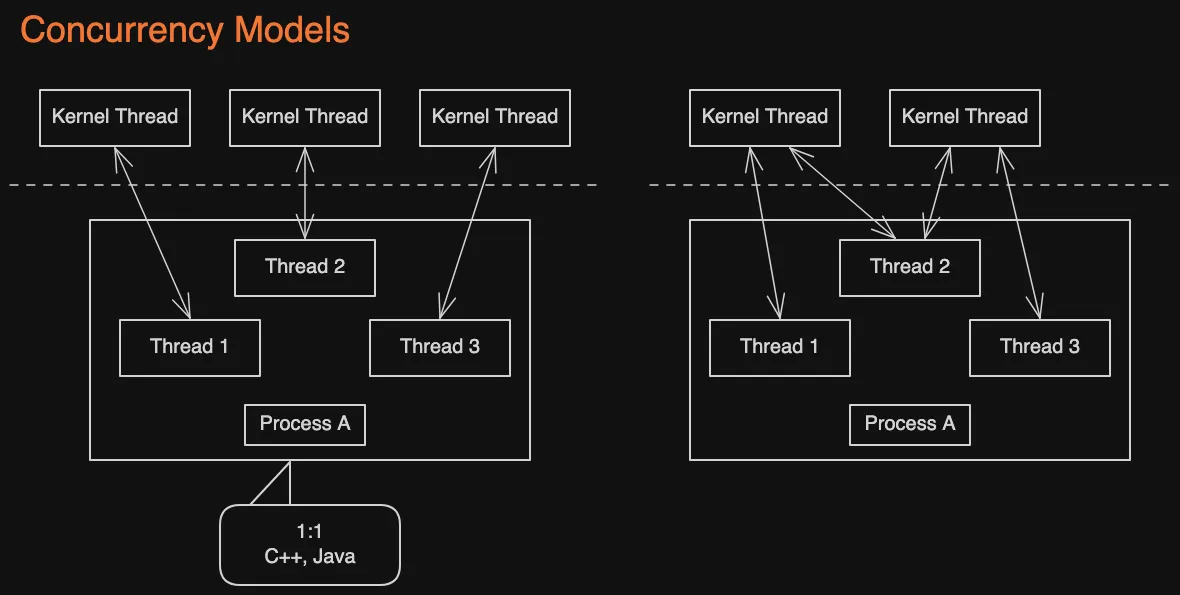
- C++ and Java use the 1:1 model on the left: one thread = one kernel thread
- Go uses the model on the right: each kernel thread runs one or more goroutines, and the mapping can change
| Goroutine | Thread | |
|---|---|---|
| Creation count | Millions, easily | Typically around 10,000 |
| Memory | Starts at a few KB stack, grows and shrinks automatically | Fixed stack, set at creation, usually MB |
| Context switch | Saves only 3 registers, about 200 ns | Saves dozens of registers, about 1000 ns |
| Scheduling | Go runtime switches goroutines at cheap points where little state needs saving. From the developer’s view it behaves like preemptive | Preemptive, when its time slice runs out, a CPU interrupt forcibly switches it out, and a lot of state must be saved |
| Create & destroy | Cheap, all at user level by Go runtime | Expensive, involves kernel. The usual fix is a thread pool |
13. GMP Model
So how does Go run millions of goroutines on a few kernel threads? The GMP scheduler.
- G = Goroutine
- M = Machine, an OS thread. Each M is bound 1:1 to a kernel thread
- P = Processor, a logical scheduling context that holds a local run queue of Gs. The number of Ps defaults to the number of CPU cores, can be changed by
runtime.GOMAXPROCS(remember section 2a)
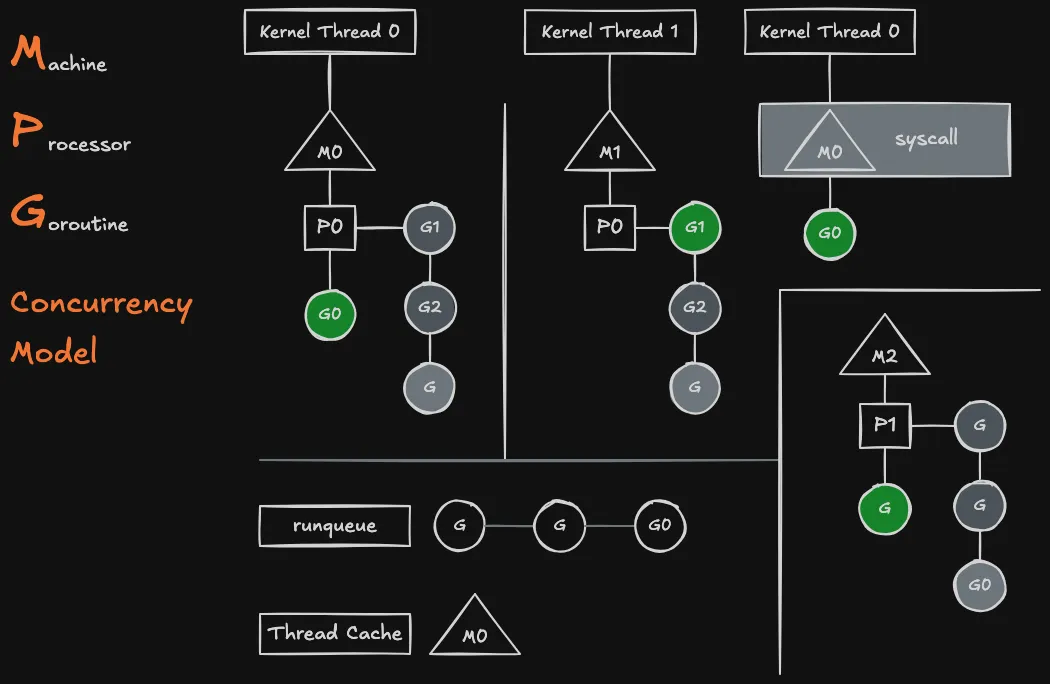
How scheduling works
- Each M is bound to one kernel thread. Each P attaches to an M
- You can create thousands of Gs but only have a few Ps and Ms. Gs line up in a P’s queue first come first served, and the P passes the front G down through M to the kernel thread
- When a G makes a blocking system call (file, network, process management, not plain computation that stays in user mode), the P detaches. G0 stays with the blocked M0. P0 picks up another M (an idle one from the thread cache, or a new one) and keeps running G1, G2… So there can be more Ms than Ps
- After the syscall returns, G0 still needs a P. It goes into the global run queue, and M0 goes idle into the thread cache
- Ps periodically check the global queue and move waiting Gs to the tail of their own queue. G0 may end up on a different P and a different M
Some takeaways
- Go programmers can’t use kernel threads directly, only goroutines
- P–M binding is dynamic, G–P binding is dynamic, so G–kernel thread is also dynamic
- Every G is equal. You can’t give a G a priority, and one G can’t control another G’s lifecycle (that’s what we saw in section 2b)
14. Limit Concurrency
Now back to code. Why limit concurrent requests?
- Too many concurrent requests can cause high CPU load
- A handler might create a large map / slice, too many at once causes high memory load
- A handler calls Redis / Postgres, too many at once overloads them too
16_qps_limit/main.go
var qps = make(chan struct{}, 100)

func handler() {
	qps <- struct{}{} // take a slot, block if 100 slots are taken
	fmt.Println("Received Request")
	defer func() {
		<-qps // give the slot back
		fmt.Println("Blocking UnLock")
	}()
	time.Sleep(3 * time.Second)
}

func main() {
	const P = 1000
	wg := sync.WaitGroup{}
	for i := 0; i < P; i++ {
		wg.Go(func() {
			handler()
		})
	}
	wg.Wait()
}
A buffered channel with capacity 100 works as a semaphore. At most 100 handlers run at the same time, the other 900 block on qps <- struct{}{} until a slot is free. You’ll see “Received Request” printed in batches of 100, every 3 seconds.
Strictly speaking this limits concurrency (in-flight requests), not requests per second. But since each request takes 3 seconds here, it’s about 100 / 3 ≈ 33 QPS.
15. Select
a. Listen Multiple Channels
17_select/main.go
func ListenMultiWay() {
	ch1 := make(chan int, 1000)
	ch2 := make(chan byte, 1000)

	go func() {
		for {
			time.Sleep(time.Duration(rand.Intn(1000)) * time.Millisecond)
			ch1 <- rand.Int()
		}
	}()

	go func() {
		for {
			time.Sleep(time.Duration(rand.Intn(1000)) * time.Millisecond)
			ch2 <- byte(rand.Int())
		}
	}()

loop:
	for {
		time.Sleep(time.Second)
		select {
		case v1 := <-ch1:
			fmt.Printf("v1=%v\n", v1)
		case v2 := <-ch2:
			fmt.Printf("v2=%v\n", v2)
			if v2 < 40 {
				break loop
			}
		default:
			fmt.Println("default")
		}
	}

	// final fallback: if ch1 got a value right when we break the loop, print it
	// use select + default so we don't block when ch1 is empty
	select {
	case v1 := <-ch1:
		fmt.Printf("at last v1=%d\n", v1)
	default:
	}
}selectwaits on multiple channels, whichever channel has data runs first. If both have data, Go picks one randomlydefaultruns when no channel is ready, which makes theselectnon-blockingbreakinsideselectonly breaks theselect, not thefor. That’s why we need a labelloop:andbreak loop
go run 17_select/main.go

# Output:
# v2=53
# v1=4958900944720906762
# v2=52
# v2=57
# v1=6815316736877713025
# v2=20
# at last v1=7680512032676148418
# I still providing services for outside
b. Block Forever
func SelectBlock() {
	// work goroutine
	go func() {
		time.Sleep(time.Second)
		fmt.Println("I still providing services for outside")
	}()

	select {} // block main goroutine forever, so the work goroutine won't be killed
}
Remember: when main returns, every goroutine dies. select {} keeps main alive. You’ll see this pattern in programs where the real work runs in background goroutines.
16. Context
context is how we tell goroutines to stop: because of a cancel, or because of a timeout.
type Context interface {
	Deadline() (deadline time.Time, ok bool) // when it expires, and whether a deadline is set
	Done() <-chan struct{}                   // closed when cancelled / timed out
	Err() error                              // why Done is closed: canceled or deadline exceeded
	Value(key any) any                       // request-scoped values
}
Look at Done(), it’s a <-chan struct{}. It’s exactly the broadcast from section 10a: when the context is cancelled, the channel is closed, and everyone waiting on it wakes up.
Everything starts from context.Background() (or context.TODO()), an empty context that never cancels.
a. WithCancel
18_context/main.go
func Timeout1() {
	ctx, cancel := context.WithCancel(context.Background())
	done := make(chan struct{})

	go func() {
		fmt.Println("Business Logic Execution")
		time.Sleep(100 * time.Millisecond)
		done <- struct{}{}
	}()

	go func() {
		time.Sleep(50 * time.Millisecond)
		cancel() // close ctx.Done()
	}()

	select {
	case <-done:
		fmt.Println("Business Logic not expired")
	case <-ctx.Done():
		fmt.Println("Business Logic expired", ctx.Err())
	}
}

// Output:
// Business Logic Execution
// Business Logic expired context canceled
The business logic needs 100ms, but someone calls cancel() at 50ms, so ctx.Done() wins.
b. WithTimeout
func Timeout2() {
	ctx, cancel := context.WithTimeout(context.Background(), 50*time.Millisecond)
	defer cancel()
	done := make(chan struct{})

	go func() {
		fmt.Println("Business Logic Execution")
		time.Sleep(100 * time.Millisecond)
		done <- struct{}{}
	}()

	select {
	case <-done:
		fmt.Println("Business Logic not expired")
	case <-ctx.Done():
		fmt.Println("Business Logic expired", ctx.Err())
	}
}

// Output:
// Business Logic Execution
// Business Logic expired context deadline exceeded
Same thing, but no need to call cancel() yourself, it closes Done() automatically after 50ms. Still defer cancel() though, it releases the timer resources if the work finishes early.
This is the same timeout pattern I used in GRPC Hands On, where the order service gives up on the payment service after 3 seconds.
c. Child Context Can’t Outlive Parent
func InheritTimeout() {
	parent, cancel1 := context.WithTimeout(context.Background(), 1000*time.Millisecond)
	t0 := time.Now()
	defer cancel1()

	time.Sleep(500 * time.Millisecond) // used 500ms, parent has 500ms left

	child, cancel2 := context.WithTimeout(parent, 1000*time.Millisecond) // child asks for 1000ms
	t1 := time.Now()
	defer cancel2()

	<-child.Done()
	fmt.Println(time.Since(t0).Milliseconds(), time.Since(t1).Milliseconds())
	fmt.Println(child.Err())
}

// Output:
// 1001 499 (around 1000 and 500)
// context deadline exceeded
The child asks for 1000ms, but the parent only has 500ms left, so the child expires with the parent. The child’s deadline is always the earlier one. If the child asks for 100ms instead, it expires after 100ms.
This is why passing ctx down through every function call works: when the request at the top times out, everything below it stops too.
d. WithValue
type StringKey string
type StringValue string
type IntValue int

func RoutineID() {
	for i := 0; i < 3; i++ {
		ctx := context.WithValue(context.Background(), StringKey("gid"), IntValue(1))
		ctx = context.WithValue(ctx, StringKey("owner"), StringValue("Fu Lim"))
		go func(ctx context.Context) {
			if gid, ok := ctx.Value(StringKey("gid")).(IntValue); ok {
				fmt.Printf("Current Goroutine %d\n", gid)
			}
			if owner, ok := ctx.Value(StringKey("owner")).(StringValue); ok {
				fmt.Printf("Current Goroutine %s\n", owner)
			}
		}(ctx)
	}
	time.Sleep(time.Second)
}- Use your own key type (
StringKey) instead of plainstring, so your key won’t collide with another package’s key Value()returnsany, so you need a type assertion- Only use context values for request-scoped data that crosses API boundaries (request ID, trace ID, user ID), not for passing optional parameters to functions
func main() {
	Timeout1()
	Timeout2()
	InheritTimeout()
	RoutineID()
}
go run 18_context/main.go17. Summary
| Problem | Tool |
|---|---|
| Run something concurrently | go f() |
| Wait for goroutines | sync.WaitGroup, wg.Go() |
| Wait and collect the first error | errgroup.Group |
| Increment a shared counter | sync/atomic |
| Protect shared data | sync.Mutex, sync.RWMutex |
| Concurrent map | sync.Map, or map + RWMutex |
| Catch a panic in a goroutine | defer recover() inside that goroutine |
| Pass data between goroutines | channel |
| Notify everyone once | close(ch) |
| Notify repeatedly | sync.Cond |
| Limit concurrency | buffered channel as semaphore |
| Wait on multiple channels | select |
| Cancel / timeout | context.WithCancel, context.WithTimeout |